Changing or cancelling
How to cancel a booking
The short answer
Cancel before the free-cancellation time. You get back all you paid for the stay, deposit too.
Step by step
Step 1: Open your stay.
Step 2: Find the line "Free cancellation until …".
It shows the last day and time to cancel for free. Times are in WAT (West Africa Time), the time in Nigeria.
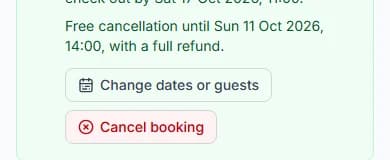
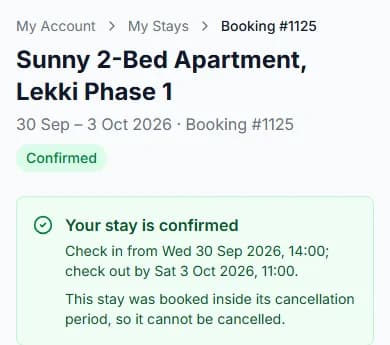
Step 3: Press "Cancel booking".
Step 4: Read "You paid" and "Refund".
They show what you paid, and what you get back.
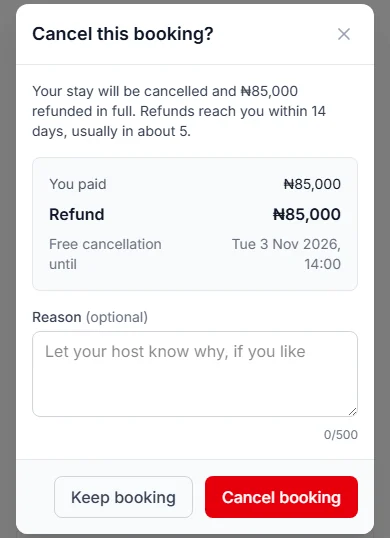
Step 5: Write a reason, if you like.
The box is called "Reason (optional)". Your host can read it.
Step 6: Press "Cancel booking" again.
Changed your mind? Press "Keep booking" instead.
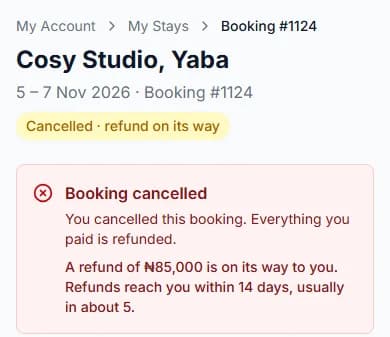
Do it now
What is the free-cancellation time?
It is the last moment to cancel and get all you paid for the stay. Each host picks it.
It can be from 24 hours (one day) to 30 days before check-in. If the host picks nothing, it is 48 hours (2 days).
The 30-day rule
Some hosts pick a long time, more than 15 days. That only counts in full if you book over 30 days ahead.
Booking closer than that? Then you can cancel free until 15 days before check-in.
What you get back
You get back 100% (all) of what you paid for the stay. That is your nights, the cleaning fee and the caution deposit.
Paystack’s fee is not refunded. That is the small fee Paystack added when you paid.
Your host does not need to agree. The Cabans team sends your refund and emails you.
The window says "Refunds reach you within 14 days, usually in about 5."
When you cannot cancel
Plans changed anyway? Press "Message [host name]" on your stay page.
- The free-cancellation time has passed. You see "This booking can no longer be cancelled".
- You booked after that time had already passed. We tell you this before you pay.
Not paid yet?
You can let an unpaid stay go at any time. Press "Release the dates" or "Cancel booking".
You paid nothing, so nothing comes back.
Questions people ask
Do I lose my caution deposit if I cancel?
No. If you cancel in time, you get the deposit back too.
Does my host have to agree?
No. If you cancel in time, it happens straight away.
Can I get some money back after the time has passed?
No. After the free-cancellation time, you cannot cancel the booking.
What if the host cancels?
You get back everything you paid for the stay. The Cabans team sends your refund and emails you. It reaches you within 14 days, usually in about 5. Paystack’s fee is not refunded.
Where can I see the cancellation time before I book?
In the booking box on the home’s page, and again at checkout.
Read next
- Changing or cancellingHow refunds workWhen you are owed money, the Cabans team sends it back to you. It arrives within 14 days, usually in about 5.
- Changing or cancellingHow to change your dates or number of guestsPick new dates. Small changes happen at once. Bigger changes need your host to say yes.
- Finding and bookingHow to check dates and the price for a stayGreen days are free. Tap the day you arrive, then the day you leave. The box shows the full price.
Still stuck?
Tell us what happened. If you have a booking number, add it. Our team will help.
Contact usLast updated