Finding and booking
How to check dates and the price for a stay
The short answer
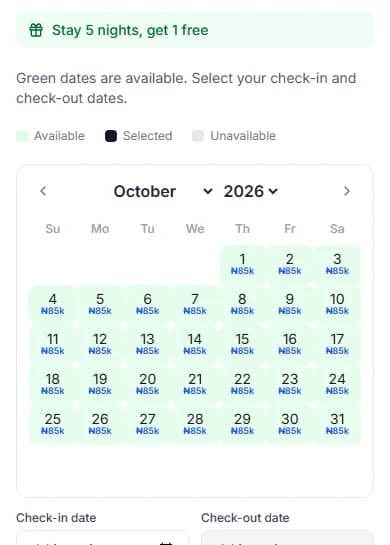
Green days are free. Tap the day you arrive, then the day you leave. The box shows the full price.
Step by step
Step 1: Open the booking box on the home’s page.
Not sure where it is? See how to find a short let you can book.
Step 2: Look at the calendar.
Green dates are free. Each free day shows its night price in small blue text, like "₦50k". That means ₦50,000 (fifty thousand naira) for the night.
Step 3: Tap the day you arrive.
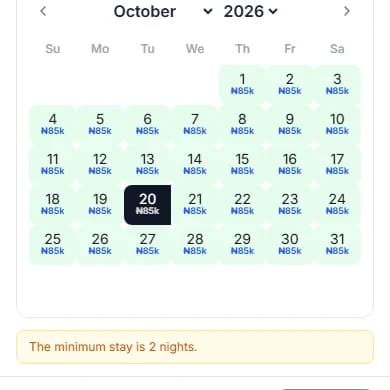
This is your check-in day.
Step 4: Tap the day you leave.
This is your check-out day. You leave that morning, so you do not pay for that night.
Step 5: Set "Guests" with the − and + buttons.
Count everyone who is staying, children too. More guests do not change the price.
Step 6: Read the green "Price Breakdown" card.
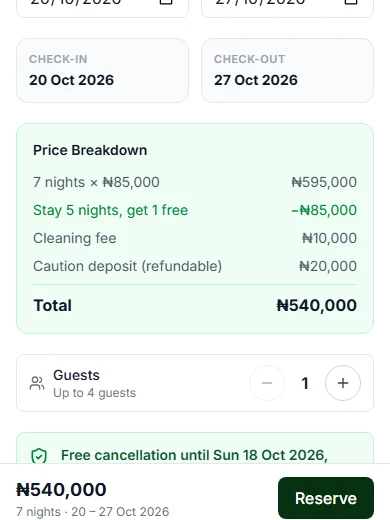
It lists your nights, any discount and the fees. The last line is the "Total".
Do it now
Words on the calendar
| The word | What it means |
|---|---|
| The word"Available" | What it meansYou can pick this night. |
| The word"Selected" | What it meansYou picked this night. |
| The word"Booked" | What it meansAnother guest has this night. |
| The word"Closed" | What it meansThe host is not taking guests that night. |
| The word"Unavailable" (grey) | What it meansThe day has passed, is too far ahead, or has no price yet. |
What the lines under the calendar mean
Each host can pick their own times. Always read them on the home’s page.
- "Check-in: from 14:00" means you can get in from 2 in the afternoon.
- "Check-out: by 11:00" means you leave by 11 in the morning.
- The "Cleaning fee" is paid once for the whole stay, not each night.
- A caution deposit is money you pay in case something gets damaged. It says "refundable". That means you get it back after your stay.
Pay less for a longer stay
Some hosts take money off longer stays. The line looks like "7+ nights, 10% off".
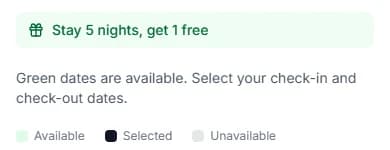
Some give free nights, like "Stay 5 nights, get 1 free". Stay 6 nights, and you pay for 5.
You get the one that saves you more, never both. The cleaning fee and caution deposit never get money off.
Why can’t I pick some dates?
The box tells you why. Here is what to do.
| The message | What to do |
|---|---|
| The message"The minimum stay is 2 nights." | What to doPick more nights. |
| The message"The maximum stay is 30 nights." | What to doPick fewer nights. |
| The message"The night of 3 Oct 2026 isn't available, so your stay can't run past it. Choose a check-out on or before 3 Oct 2026." | What to doLeave on or before that day, or pick other dates. |
| The message"That date has passed. Please choose a date from today onwards." | What to doPick today or a later day. |
| The message"No dates available yet — The host hasn't opened up booking dates for this property." | What to doTry another home. |
Questions people ask
Does the price change with more guests?
No. The price is the same for 1 guest or more. The host may set the most guests allowed, like "Up to 4 guests".
Why do some nights cost more?
The host can set different prices for some dates. The box then says "Night prices vary by date". The "Price Breakdown" shows each price.
Do I pay for the day I leave?
No. You pay for nights. The day you leave is the morning after your last night.
Is the caution deposit in the Total?
Yes. You pay it with your booking. You get it back after your stay, unless our team agrees something was damaged.
Can I cancel if my plans change?
Read the cancellation line in the box. It says "Free cancellation until …" or "No free cancellation". How to cancel a booking explains it.
Read next
- Finding and bookingHow to find a short let you can book onlineOpen a short let. If you see a box with dates and a price, you can book it online.
- Finding and bookingHow to reserve your datesPress "Reserve". We keep the dates just for you for 30 minutes while you pay. Nothing is charged yet.
- Changing or cancellingHow to cancel a bookingCancel before the free-cancellation time. You get back all you paid for the stay, deposit too.
- Leaving and your caution depositHow to get your caution deposit backAfter you leave, the host checks the home and gives the deposit back. If they have not after 14 days (two weeks), ask us.
More on Cabans
Still stuck?
Tell us what happened. If you have a booking number, add it. Our team will help.
Contact usLast updated