Requests and decisions
How to accept or decline a booking request
The short answer
A guest has paid and is waiting. Press "Accept booking". Or press "Decline", and they get back what they paid for the stay.
Step by step
Step 1: Open "Bookings", then the "Requests" tab.
You also get an email: "New booking request for [home name]".
Step 2: Open the request.
You see "New booking request". The guest has already paid.
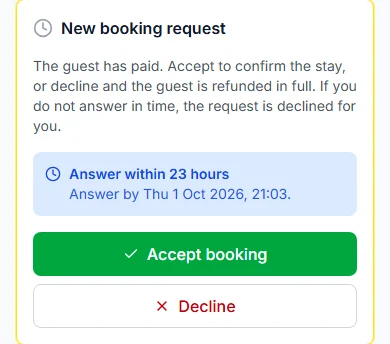
Step 3: Read "Answer within …" to see your time left.
It also shows the exact time, like "Answer by Wed 30 Sep 2026, 19:31".
Step 4: Press "Accept booking" to say yes.
You see "Booking accepted. The guest has been told." The stay is now confirmed.
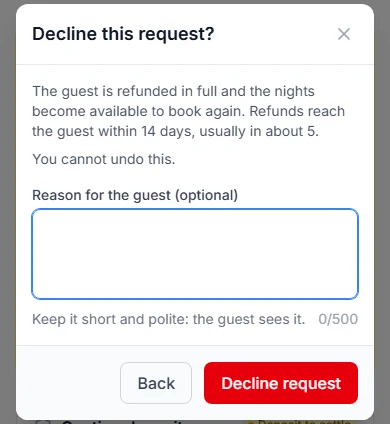
Step 5: Press "Decline" to say no.
Add a "Reason for the guest (optional)" if you like. Then press "Decline request".
Good to know: You cannot undo a decline. The guest gets back everything they paid for the stay. The nights open again.
Do it now
If you do not answer in time
The request is declined for you. The guest gets back everything they paid for the stay.
You get an email: "A booking request for [home name] lapsed".
Your answer time is 24 hours (one day), unless you picked another. Change it in your booking rules.
With instant book
Paid bookings are confirmed straight away. There is nothing to accept.
You get an email: "New confirmed booking for [home name]".
When a guest asks to change dates
Date changes also show under "Requests". You get "Date change request for [home name]".
Open it. Compare "Now" with "Asked for". Then read the money line.
- To say yes, press "Approve new dates". Then press "Approve new dates" again.
- To say no, press "Keep the original dates". Then press "Keep original dates".
- If you do not answer, the request lapses. The booking stays as it was.
The money line on a date change
| The line says | What it means |
|---|---|
| The line says"The guest will be sent an invoice for the extra ₦X." | What it meansThe new dates cost more. The guest pays the difference. |
| The line says"The guest will be owed a refund of ₦X." | What it meansThe new dates cost less. The guest gets money back. |
| The line says"The price does not change." | What it meansNobody pays anything more. |
Questions people ask
Has the guest paid before I accept?
Yes. A request only reaches you once the guest has paid.
Can I change my mind after I decline?
No. You cannot undo a decline.
Who sends the guest’s money back when I decline?
The Cabans team sends the refund and emails the guest. It reaches them within 14 days (two weeks), usually in about 5. Paystack’s fee is not refunded.
What if I miss a date change request?
It lapses. The booking keeps its old dates.
Read next
- Requests and decisionsHow to use your Bookings page"Bookings" shows every guest in tabs. New requests, arriving, staying, leaving and past.
- Requests and decisionsHow to cancel a booking as a hostIf you truly cannot host, cancel before the guest arrives. Say why. The guest gets back what they paid for the stay.
- Getting bookableHow to set your booking rules and instant bookChoose how guests book. Set the shortest and longest stay, the most guests and how far ahead. Then say yes yourself, or let instant book do it.
More on Cabans
Still stuck?
Tell us what happened. If you have a booking number, add it. Our team will help.
Contact usLast updated