Requests and decisions
How to use your Bookings page
The short answer
"Bookings" shows every guest in tabs. New requests, arriving, staying, leaving and past.
Step by step
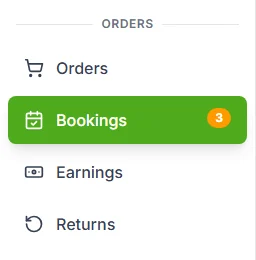
Step 1: Open "Bookings" in the seller menu.
It is under "ORDERS". An amber number next to it means requests are waiting.
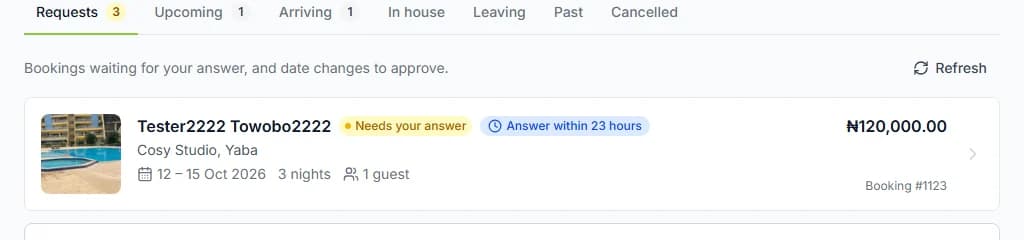
Step 2: Pick a tab.
Start with "Requests". Those guests have paid and are waiting for your answer.
Step 3: Pick a home in "Property" to see only that one.
Leave it on "All properties" to see every home.
Step 4: Press a booking to open it.
That is where you answer requests, check guests in and settle the caution deposit.
Step 5: Press "Earnings" at the top to see your money.
It shows what each stay earned and when we pay you.

Do it now
What each tab holds
| Tab | What is in it |
|---|---|
| Tab"Requests" | What is in itGuests who paid and wait for your answer. Date changes to answer. |
| Tab"Upcoming" | What is in itConfirmed stays that start after tomorrow. |
| Tab"Arriving" | What is in itGuests due from yesterday to tomorrow who are not checked in yet. |
| Tab"In house" | What is in itGuests who have the keys, or are checked in. Requests to stay longer. |
| Tab"Leaving" | What is in itGuests checking out today, or who asked to check out. |
| Tab"Past" | What is in itFinished stays, and deposits still to settle. |
| Tab"Cancelled" | What is in itCancelled and declined bookings, newest first. |
What each row shows
You see the guest’s name, dates, nights, guests, total and booking number.
A request also says "Needs your answer" and the time left, like "Answer within 21 hours".
You see the guest’s name, but never their email. "Booked by a business" means a company booked.
What never shows here
Guests who pressed "Reserve" but have not paid. Pay later bookings that are not paid yet.
A booking only reaches you once it is paid.
The page keeps itself fresh
An open booking page refreshes itself every minute. You can also press "Refresh".
Emails you get
Here are the main ones. See every email you can get on the hosts help page.
Your store’s email and the store owner get these. So do up to 10 team members who manage bookings.
| When | The email subject |
|---|---|
| WhenA guest paid and waits for you | The email subject"New booking request for [home name]" |
| WhenA guest paid for an instant booking | The email subject"New confirmed booking for [home name]" |
| WhenYou did not answer in time | The email subject"A booking request for [home name] lapsed" |
| WhenA guest asks to change dates | The email subject"Date change request for [home name]" |
| WhenA guest has arrived | The email subject"[guest name] has arrived at [home name]" |
| WhenA guest is leaving | The email subject"[guest name] is leaving [home name]" |
| WhenA guest asks for something | The email subject"[guest name] needs [what they need] at [home name]" |
| WhenA guest wants to stay longer | The email subject"A guest wants to extend their stay at [home name]" |
| WhenYour payout is due | The email subject"Your payout for [home name] is due" |
Questions people ask
Why is a guest on hold not in my list?
Holds never reach you. You see a booking once the guest has paid.
Can I see the guest’s email?
No. You see their name. Guests can message you in "Chat", and you can reply there.
What does the amber number mean?
It is how many requests are waiting for your answer.
Can my team use the Bookings page too?
Yes, with the right role. See how to let your team manage bookings.
Read next
- Requests and decisionsHow to accept or decline a booking requestA guest has paid and is waiting. Press "Accept booking". Or press "Decline", and they get back what they paid for the stay.
- Your team and moneyHow to see your earnings and payoutsOpen "Earnings". It shows what each stay earned and what we pay you. We pay you 7 days after check-out, or sooner.
- Your team and moneyHow to let your team manage bookingsAdd your team. Give each person a role with the right permissions. Then they can look after bookings for you.
- Host Academy · lesson 1How a Cabans booking works, start to finishA guest picks dates and pays. You say yes, or instant book says yes for you. You welcome them, they leave, you settle the deposit, and we pay you.
More about requests and decisions
More on Cabans
Still stuck?
Tell us what happened. If you have a booking number, add it. Our team will help.
Contact usLast updated