Host Academy · Lesson 1 · about 5 minutes
How a Cabans booking works, start to finish
The short answer
A guest picks dates and pays. You say yes, or instant book says yes for you. You welcome them, they leave, you settle the deposit, and we pay you.
What you will learn
- What happens when a guest presses "Reserve".
- When you must answer a booking request.
- When your guest sees the door code.
- How a stay ends, and what happens to the caution deposit.
- How and when you are paid for the stay.
The eight steps of a booking
Step 1: A guest picks dates and presses "Reserve".
We keep those nights for 30 minutes (half an hour) while they pay. No money is taken yet. You do not see this step.
Step 2: The guest pays.
They pay through Paystack. Paystack is the payment company we use. It takes cards, bank transfer and USSD (paying by dialling a code on your phone). Or the guest picks "Pay After Checkout". Then they have 2 hours to pay.
Good to know: Paystack charges a fee. The guest pays it on top of the price. It never comes out of your money.
Step 3: You say yes, or instant book says yes for you.
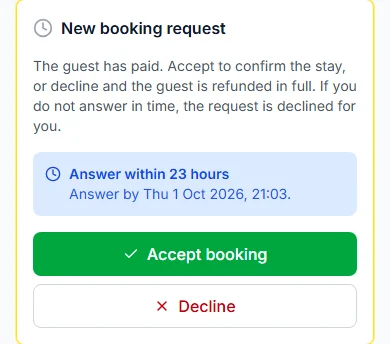
If "Instant book" is off, you get a request. Press "Accept booking" or "Decline". If "Instant book" is on, a paid booking is confirmed straight away.
Good to know: You have 24 hours (one day) to answer, unless you picked another time. If you do not answer in time, the request is declined. The guest gets back what they paid for the stay.
Step 4: The guest arrives and presses "I have arrived".
We email you. Give the guest the keys and press "Hand over keys". Then press "Approve check-in". Now the guest can see the door code and Wi-Fi password on their stay page.
Good to know: We never email the codes. The guest only sees them after you approve check-in.
Step 5: Help your guest during the stay.
Guests can ask for things, like fresh towels or a cleaner. Press "Start", then "Mark as done". If they used extras, like bottled water, send a bill with "Bill the guest".
Step 6: The guest leaves, and you confirm check-out.
The guest presses "I am leaving". Check the home, then press "Confirm check-out". The guest stops seeing the codes.
Good to know: If nobody confirms, the stay ends by itself 2 days after the check-out date.
Step 7: You settle the caution deposit.
A caution deposit is money the guest pays in case something gets damaged. If all is fine, press "Approve full refund". If something was damaged, press "Raise a dispute" and show proof. Our team reads both sides and decides.
Good to know: Nothing is kept until our team decides. Settle it soon, within 14 days (two weeks).
Step 8: We pay you for the stay.
The money we send you is called your payout. We send it within 7 days (one week) after check-out. If the guest presses "Approve payment", we send it sooner.
Good to know: The Cabans team sends each payout by hand. We email you when it is due, and again when it is paid.
Words you will see
You and your guest see different words for the same moment.
| What is happening | Your guest sees | You see |
|---|---|---|
| What is happeningA guest paid and waits for you | Your guest sees"Waiting for the host" | You see"Needs your answer" |
| What is happeningThe booking is on | Your guest sees"Confirmed" | You see"Confirmed" |
| What is happeningThe guest is at the door | Your guest sees"Arrived" | You see"Guest has arrived" |
| What is happeningYou gave the keys | Your guest sees"Keys handed over" | You see"Keys handed over" |
| What is happeningThe guest is fully in | Your guest sees"Checked in" | You see"Checked in" |
| What is happeningThe guest is leaving | Your guest sees"Checking out" | You see"Wants to check out" |
| What is happeningThe stay is over | Your guest sees"Completed" | You see"Completed" |
How your payout is worked out
Start with what the guest paid for the stay. Add any bills and extras they paid. Take away any refunds.
Then Cabans keeps a 5% commission. A commission is our share for running Cabans. 5% is ₦5 (five naira) in every ₦100.
Say a guest pays ₦350,000 (three hundred and fifty thousand naira) for 7 nights. The commission is ₦17,500. Your payout is ₦332,500.
The caution deposit is held for the guest, so it is not in your payout.
Where you do it all
In the seller menu, open "ORDERS", then "Bookings". An orange number shows requests waiting for you.
The page has seven tabs, from "Requests" to "Cancelled". Each booking moves along them as the stay goes on.
Your money is on the "Earnings" page, also under "ORDERS".
What our team does
- Checks changes to your listing before guests see them.
- Sends refunds to guests.
- Decides a caution deposit dispute when you raise one.
- Sends your payout for each stay.
Your practice task
Do this on the real screen. The "Open Bookings" button is just below.
- Find the seven tabs, from "Requests" to "Cancelled".
- Open "Requests". Is a guest waiting for your answer?
- Open any booking you have. Which of the eight steps is it at?
- Then answer the three questions below. After that, go on to lesson 2: Make your first listing bookable.
Try it yourself
Open the real screen and find each step from this lesson.
Check what you learned
Pick an answer, then press "Check my answer". You can try again as many times as you like.
Questions people ask
Do I see guests who have not paid yet?
No. Dates on hold and unpaid "Pay After Checkout" bookings never reach your Bookings page. You see a booking once it is paid.
Who sends a refund to a guest?
The Cabans team sends it and emails the guest. Refunds reach the guest within 14 days, usually in about 5. Paystack’s fee is not refunded.
Read next
- Requests and decisionsHow to use your Bookings page"Bookings" shows every guest in tabs. New requests, arriving, staying, leaving and past.
- Requests and decisionsHow to accept or decline a booking requestA guest has paid and is waiting. Press "Accept booking". Or press "Decline", and they get back what they paid for the stay.
- Arrival and the stayHow to hand over keys and check your guest inWhen your guest arrives, give them the keys. Then press "Approve check-in". Only then do they see the door code.
- Check-out and the caution depositHow to release a caution deposit or raise a disputeIf all is fine, give the deposit back. If something was damaged, raise a dispute with proof. Our team decides.
- Your team and moneyHow guest payments, refunds and payouts workThe guest pays us through Paystack. After the stay, we pay you. We keep a 5% commission.
More on Cabans
Still stuck?
Tell us what happened. If you have a booking number, add it. Our team will help.
Contact usLast updated