Your team and money
How to see your earnings and payouts
The short answer
Open "Earnings". It shows what each stay earned and what we pay you. We pay you 7 days after check-out, or sooner.
Step by step
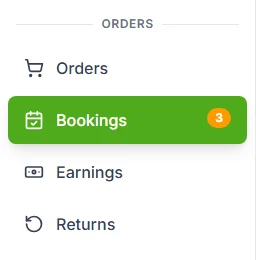
Step 1: Open "Earnings" in the seller menu.
It is under "ORDERS", below "Bookings". You can also press "Earnings" at the top of your Bookings page.
Step 2: Read the four boxes at the top.
Each box adds up all your stays. The table below says what each one means.

Step 3: Pick a filter to see fewer stays.
Press "All", "Not due yet", "Due" or "Paid".
Step 4: Press "Details" on a stay.
You see how the payout was worked out, line by line.
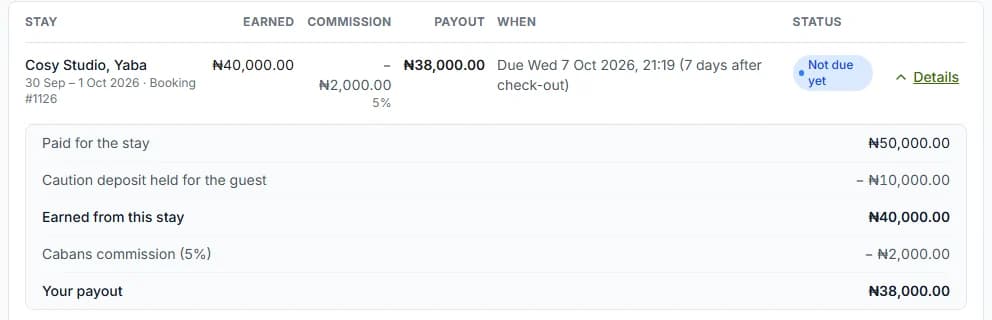
Step 5: Check the "Status" of each payout.
When it says "Paid", you also see the transfer reference. Use it to find the money in your bank account.
Do it now
The four boxes
| The box | What it means |
|---|---|
| The box"Not due yet" | What it meansStays that ended less than 7 days ago. |
| The box"Due to you" | What it meansMoney the Cabans team is sending you now. |
| The box"Paid to you" | What it meansMoney we have already sent. |
| The box"Commission (5%)" | What it meansWhat Cabans kept. |
When you are paid
- We work out your payout when the check-out is confirmed.
- It is due 7 days (one week) after check-out.
- If the guest presses "Approve payment" after the stay, it is due straight away.
- The Cabans team sends the money to your bank account by hand.
The lines on a payout
You see these lines under "Details", and on the booking in the card "Your payout".
| The line | What it means |
|---|---|
| The line"Paid for the stay" | What it meansWhat the guest paid for the nights. New dates and extra nights count too. |
| The line"Bills and extras paid" | What it meansBills you sent, and extras the guest bought. |
| The line"Caution deposit held for the guest" | What it meansThe deposit. It is still the guest’s, so it is taken off. |
| The line"Refunded to the guest" | What it meansAny money the guest got back. |
| The line"Earned from this stay" | What it meansWhat is left after that. |
| The line"Cabans commission (5%)" | What it meansWhat Cabans keeps. That is ₦5 of every ₦100. |
| The line"Your payout" | What it meansWhat we send you. |
What each status means
| The status | What it means |
|---|---|
| The status"Not due yet" | What it meansThe 7 days are not over yet. |
| The status"Due to be paid" | What it meansThe Cabans team is sending it. |
| The status"Paid" | What it meansThe money was sent. The transfer reference is shown. |
| The status"On hold" | What it meansOur team has paused it. Contact us to ask why. |
| The status"Cancelled" | What it meansThere is nothing to pay for this stay. |
Emails you get
- "Your payout for [home name] is due" when it is due.
- "Your payout for [home name] was paid" when it is sent. It has the transfer reference.
- "A further payment for [home name] was sent" if our team gives you part of a deposit later.
If you see a message
| The message | What to do |
|---|---|
| The message"You cannot see this store's earnings" | What to doAsk the store owner to tick "Read Only" under "Orders" on your role. |
| The message"No earnings yet" | What to doA payout shows here once a check-out is confirmed. |
Questions people ask
Is Paystack’s fee taken from my payout?
No. The guest pays Paystack’s fee on top of the price. It is never taken from you.
Is the caution deposit in my payout?
No. It belongs to the guest. If our team gives you part of it after a dispute, we send you that part too.
Can I get paid sooner?
Yes, if the guest presses "Approve payment" after their stay. Then your payout is due straight away.
Who sends the money?
The Cabans team sends it to your account by hand. Then we email you the transfer reference.
Can my team see earnings?
Yes, if their role has "Read Only" ticked under "Orders".
Read next
- Your team and moneyHow guest payments, refunds and payouts workThe guest pays us through Paystack. After the stay, we pay you. We keep a 5% commission.
- Check-out and the caution depositHow to confirm check-out and add condition photosWhen your guest leaves, check the home. Add photos if you like. Then press "Confirm check-out".
- Check-out and the caution depositHow to refund unused nights when a guest leaves earlyA guest left early? The nights they did not use are not refunded. You can choose to give them back.
- Your team and moneyHow to let your team manage bookingsAdd your team. Give each person a role with the right permissions. Then they can look after bookings for you.
- Leaving and your caution depositHow to approve payment to your hostWas your stay fine? Press "Approve payment" and we pay your host now. If you do nothing, we pay them 7 days after your stay.
More on Cabans
Still stuck?
Tell us what happened. If you have a booking number, add it. Our team will help.
Contact usLast updated