Check-out and the caution deposit
How to confirm check-out and add condition photos
The short answer
When your guest leaves, check the home. Add photos if you like. Then press "Confirm check-out".
Step by step
Step 1: Look out for the email when your guest is leaving.
Your guest presses "I am leaving". You get "[guest name] is leaving [home name]".
Step 2: Check the home.
Look for anything damaged or missing.
Step 3: Open the booking and press "Confirm check-out".
A box asks "Confirm the check-out?".
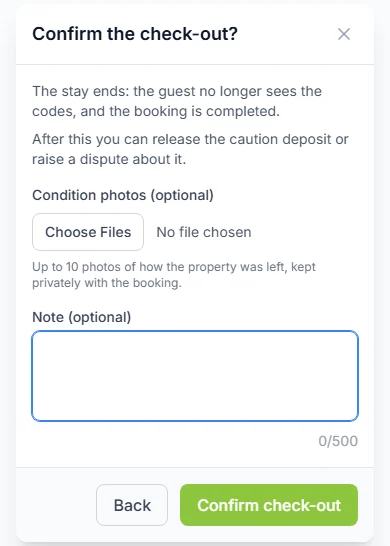
Step 4: Add "Condition photos (optional)".
Add up to 10 photos of how the home was left. They are kept privately with the booking.
Step 5: Press "Upload photos and confirm".
No photos? Press "Confirm check-out" instead.
Do it now
What happens next
- Your guest stops seeing the door code and Wi-Fi password.
- The booking is marked "Completed".
- Now you can give back the caution deposit, or raise a dispute about it.
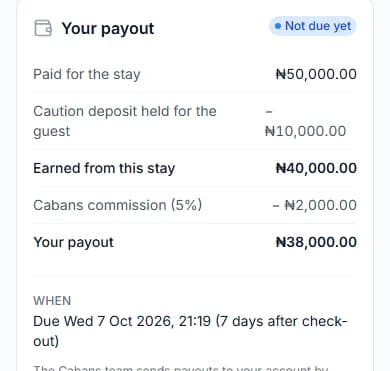
- We work out your payout. You see it in the card "Your payout" on the booking.
Good to know
- You can confirm even if your guest never pressed "I am leaving".
- If nobody confirms, the stay ends by itself 2 days after the check-out date.
- We email your guest to thank them for staying.
When you are paid
Our email to your guest asks them to press "Approve payment" if all went well.
Then your payout is due straight away. If not, it is due 7 days (one week) after check-out.
If your guest left early
Confirm the check-out on the day they leave. The booking then shows "The guest left early".
The unused nights are not refunded, unless you choose to. See how to refund unused nights.
Why photos help
A caution deposit is money a guest pays in case something gets damaged.
Photos show how the home was left. They are your proof if you need to raise a dispute.
Photo rules
- Add up to 10 photos each time.
- Each photo can be up to 10 MB (megabytes).
- Add more later with "Add check-out photos", until the deposit is settled or disputed.
Questions people ask
What if my guest leaves without pressing "I am leaving"?
You can still press "Confirm check-out".
What if I forget to confirm check-out?
The stay ends by itself 2 days after the check-out date. It is better to check the home and confirm it yourself.
Can I add photos later?
Yes. Use "Add check-out photos" until the deposit is settled or disputed.
Read next
- Check-out and the caution depositHow to release a caution deposit or raise a disputeIf all is fine, give the deposit back. If something was damaged, raise a dispute with proof. Our team decides.
- Check-out and the caution depositHow to refund unused nights when a guest leaves earlyA guest left early? The nights they did not use are not refunded. You can choose to give them back.
- Your team and moneyHow to see your earnings and payoutsOpen "Earnings". It shows what each stay earned and what we pay you. We pay you 7 days after check-out, or sooner.
- Arrival and the stayHow to hand over keys and check your guest inWhen your guest arrives, give them the keys. Then press "Approve check-in". Only then do they see the door code.
More on Cabans
Still stuck?
Tell us what happened. If you have a booking number, add it. Our team will help.
Contact usLast updated