Check-out and the caution deposit
How to refund unused nights when a guest leaves early
The short answer
A guest left early? The nights they did not use are not refunded. You can choose to give them back.
Step by step
Step 1: Confirm the check-out as usual.
Do this when the guest leaves, even before their check-out date. See how to confirm check-out.
Step 2: Open the booking and find "The guest left early".
It says the unused nights are not refunded. They are not put back on sale either. That changes only if you approve a refund.
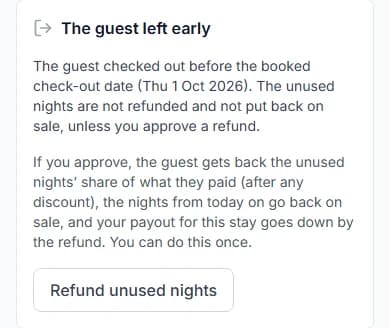
Step 3: Decide if you want to refund them.
If you do nothing, the guest gets nothing back. The nights are not put back on sale.
Step 4: Press "Refund unused nights".
A box asks "Refund the unused nights?". Add a "Note for the guest (optional)" if you like.
Good to know: You cannot undo this. You can only do it once for each stay.
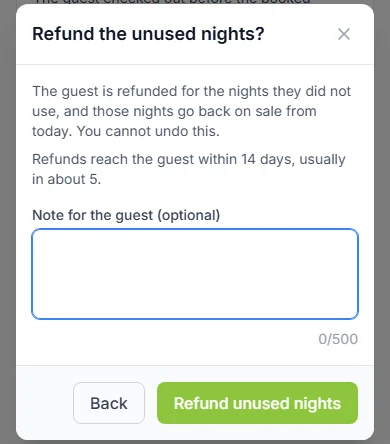
Step 5: Press "Refund unused nights" again to confirm.
You see "Refund approved. The guest has been told." The page shows the amount and how many nights are back on sale.
Do it now
What happens next
- The guest gets back the share they paid for the unused nights, after any discount.
- The nights from today on go back on sale. Other guests can book them.
- The Cabans team sends the refund. We email the guest: "A refund for your unused nights at [home name]".
- Refunds reach the guest within 14 days (two weeks). Most arrive in about 5 days.
- Your payout for this stay goes down by the refund.
Do it before you are paid
Your payout is due 7 days after check-out, or sooner if the guest approves it.
Once you are paid, you cannot refund unused nights here. You see "You have already been paid for this stay, so the unused nights can no longer be refunded here. Please contact support."
If that happens, contact our team.
Messages you might see
| The message | What it means |
|---|---|
| The message"The guest did not leave before the booked check-out date, so there are no unused nights to refund." | What it meansThe guest stayed to the end. There is nothing to refund. |
| The message"You do not have permission to do that for this store." | What it meansYour role needs "Update / Process Orders". |
Questions people ask
Is the refund automatic when a guest leaves early?
No. Nothing is refunded unless you press "Refund unused nights".
Can I refund only some of the nights?
No. It refunds all the nights from the day the guest left.
Is the cleaning fee or caution deposit part of this refund?
No. This is only for the unused nights. You settle the caution deposit on its own.
Is Paystack’s fee refunded?
No. Paystack’s fee is never refunded.
Read next
- Check-out and the caution depositHow to confirm check-out and add condition photosWhen your guest leaves, check the home. Add photos if you like. Then press "Confirm check-out".
- Your team and moneyHow to see your earnings and payoutsOpen "Earnings". It shows what each stay earned and what we pay you. We pay you 7 days after check-out, or sooner.
- Check-out and the caution depositHow to release a caution deposit or raise a disputeIf all is fine, give the deposit back. If something was damaged, raise a dispute with proof. Our team decides.
- Your team and moneyHow guest payments, refunds and payouts workThe guest pays us through Paystack. After the stay, we pay you. We keep a 5% commission.
More on Cabans
Still stuck?
Tell us what happened. If you have a booking number, add it. Our team will help.
Contact usLast updated