A hotel booking website for a small Nigerian property needs to do more than display attractive bedrooms. Guests need to understand the exact space, check dates and know how a stay becomes confirmed. Your team needs to maintain those promises after the website has been built. The daily work matters as much as the page design.
This guide explains a practical alternative for operators who sell by the unit: a free Cabans store page that brings your live listings together, with guests booking through the relevant listing. Read the serviced apartment and small hotel booking system overview for the wider workflow. Cabans is the marketplace; you provide the accommodation, set up its information and remain responsible for your guests.
What a small hotel booking website must answer
A guest planning a visit to Lagos, Abuja or another Nigerian city starts with practical questions. Is this an entire apartment or a room? Is the bathroom private? Which part of the city is it in? Will the room accommodate the people travelling? How do they choose dates and find the applicable booking terms? A beautiful homepage that leaves these questions unanswered creates more calls for reception.
Write down those answers for each unit before commissioning a design or opening a booking page. Include honest information about water, backup power, parking, stairs and shared areas where relevant. If a facility is subject to restrictions, explain them. Avoid broad labels such as fully serviced when the actual services and their availability are unclear.
To assess the page from a traveller's perspective, search for serviced apartments in Lagos and note which listings make the space and arrival arrangements easy to understand. Compare clarity, rather than assuming a decorative banner makes a property more suitable.
A Cabans store page as your hotel booking website starting point
Your store page gives guests one place to find your live property listings. The link includes your business name and a store number, in the form cabans.ng/store/{id}/{business-name}. Use the actual published link supplied by your account instead of making up a shorter address. This is a page on Cabans, using Cabans' design; it is not a custom domain or a separately designed website.
Problem: reception sends several room links and separate photo collections whenever someone asks what is available.
Cabans feature: your business store page brings your live listings together; guests follow the relevant unit listing to its booking flow.
Result: one business link starts the journey, while each unit keeps its own description and dates.
Share that store link in your business profile, messages and social posts where appropriate. For a guest asking about a particular room, send the relevant unit link so they land on the accommodation you discussed. The broad store link and the specific unit link have different uses; label each clearly instead of making the guest guess.
Cabans provides the page, so you do not maintain separate hosting and a domain for that page. You still maintain the property information and your operating process. Free access to a public page is not the same as saying every transaction has no payment terms. Review the host online booking guide before you start taking stays.
Build the booking journey around a specific room or apartment
Set up each independently bookable unit as a separate listing. If you have several rooms with similar furniture, identify each clearly and use photos that represent the actual room. Cabans does not sell a room category from pooled hotel inventory and allocate a room number later. A guest booking one unit should not be offered a different room simply because another booking arrived first.
Make your public naming agree with the labels used by reception. If a room is accessible only by stairs or shares a sitting area, say so in the description. Explain what is included and which services need a separate arrangement. Clear descriptions reduce the number of questions guests must ask before they can decide whether the accommodation fits their trip.
Problem: a booking page looks available while the room has already been promised by telephone.
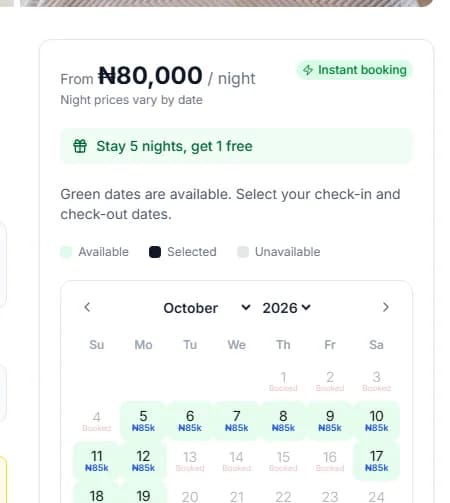
Cabans feature: the short let unit has a calendar where you close unavailable dates.
Result: you can make the dates offered on Cabans reflect the commitments your team has recorded.
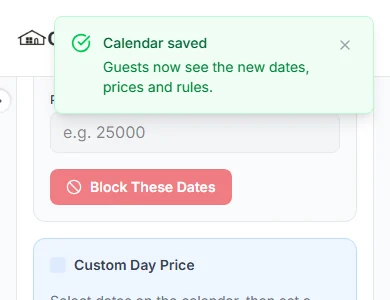
There is no iCal, calendar sync or channel manager. When a room is booked elsewhere, someone must close the relevant Cabans dates, and the reverse applies when a Cabans booking is confirmed. A public website does not remove this duty. If the same room is advertised in several places, use the channel manager guide to assess the risk before adding more booking sources.
Once you have the room details and its existing commitments, create a short let listing for your first unit. Review it carefully before repeating the setup for the remaining accommodation.
Check what happens after the guest chooses dates
A useful booking website connects the guest's intention to a clear confirmation process. On Cabans, the guest follows the listing's booking flow and pays online. With instant book enabled, paid bookings confirm without waiting for you. If you use requests, you answer the paid request. Train the people answering the phone to recognise that distinction.
Problem: a guest thinks a conversation or a forwarded payment image is enough to reserve the room.
Cabans feature: the guest pays through the booking journey, with confirmation following your instant-book or request setting.
Result: both sides can work from the booking record instead of a collection of disconnected messages.
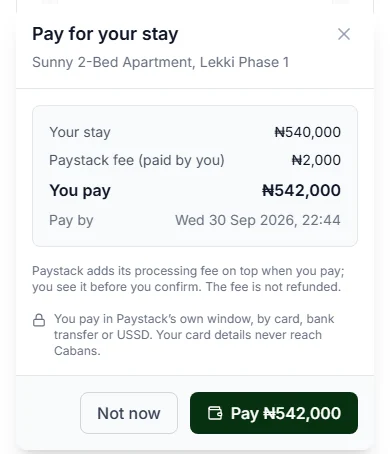
Use consistent wording in the messages you send guests. Point them to their booking record to check status and terms. Keep reception's instructions aligned with the flow shown on the listing. The guest house setup guide explains how to connect the unit list, calendar and daily handover.
Review your hotel booking page on a phone
- Prepare your public business details. Use the business name guests recognise and check your contact details and property location before sharing your page.
- List each independently bookable unit. Create a separate short let listing for each room or apartment, with accurate photos, facilities and guest capacity.
- Set availability and booking rules. Close nights already promised, review the calendar and choose instant book or the request option.
- Review the guest journey. Open your public store page on a phone, follow a unit listing and check the date-selection and booking information.
- Share and maintain the link. Use the published store link in your messages and profile, and give someone responsibility for keeping unit details and dates accurate.
Ask someone outside your team to open the shared link on a phone. Can they tell which business operates the accommodation? Can they identify the room, location, facilities and dates? Can they find the booking information without calling for a photo collection? Test ordinary navigation without placing an unnecessary real booking just to demonstrate that a button exists.
Review the link again after changing your property details. Do not leave an old room description in a social post while the listing says something different. Keep a short checklist for photos, facilities, booking dates and who answers requests. This is the maintenance that matters to a guest, even when there is no separate website to update.
Set realistic expectations about search and hotel operations
A published store page with a business name can be indexed, but that does not guarantee a Google position or an occupancy level. Accurate original descriptions help people understand the property; copied descriptions and unsupported claims do not improve the underlying accommodation. Share your link with people already asking about your rooms and measure whether they can complete the journey you intended.
Cabans also does not provide a full hotel PMS, restaurant POS or housekeeping rotas. A page that takes bookings does not automatically run every department. Use the small hotel management software checklist if your requirements include wider operations, room-type allocation or several booking channels.
Frequently asked questions
Can a small hotel use a Cabans store page instead of a separate booking website?
A small operator selling specific rooms or apartments can use a free Cabans store page to bring its live listings together. Guests follow a unit listing to choose dates and book. It is not a custom hotel website or a full hotel PMS.
Can I use my own domain for the Cabans page?
No. The page is on cabans.ng, with a store number and your business name in the link. Cabans does not offer a custom domain for the store page.
Does the store page put all identical hotel rooms into one inventory pool?
No. Plan one listing and calendar per independently bookable unit. Do not use one listing as a shared pool of interchangeable hotel rooms.
Does a page on Cabans guarantee bookings or a Google position?
No. A published store page can be indexed, but indexing, search positions and bookings are not guaranteed. Accurate listings and a working availability process still matter.
Give guests a clear place to begin
Review the serviced apartment and small hotel booking system and list your first independently bookable unit when its information is ready. Then share the published business link and keep the dates accurate. For a final guest-perspective check, browse serviced apartments in Abuja and ask whether your own page answers the practical questions a traveller would bring.
Take the next step
Keep your research practical: search for property in Lagos, compare live options for properties in Lagos, or list your property on Cabans to reach active buyers and renters.
Not ready yet? Get an email when new listings go up in Lagos.