
Small hotel management software should fit how you sell rooms and run a shift. A serviced apartment operator with separate flats has different needs from a hotel selling interchangeable room types, running a restaurant and allocating cleaning work across floors. A long feature list is useful only when the features match those jobs.
This Nigeria-focused checklist explains what to test before choosing hospitality management software. It shows what the Cabans serviced apartment booking system covers for operators who sell by the unit, and where you will need a separate process or another system. Cabans is not a hotel PMS. Use the practical gaps below as selection criteria, rather than assuming every product labelled booking software does the same work.
Define the jobs before choosing hotel management software
Write down what happened during an ordinary busy day at your property. Include the telephone reservation, the guest arriving before the room is ready, the person asking for breakfast, the room closed for a repair and the shift change. Beside each event, record who needed information and where it was stored. This gives you a much stronger brief than asking for an all-in-one package.
Separate three jobs. Selling accommodation means showing the right space and dates. Running a stay means welcoming the guest and answering requests. Running the business includes staff scheduling, accounts, supplies and any restaurant. One tool may cover parts of several jobs without covering every part of any one of them.
Start with the guest's view too. Search for serviced apartments in Abuja and make a list of the information you need to decide whether a unit suits a trip. Your own software should help you keep that information accurate, rather than simply making the dashboard attractive.
The small hotel management software essentials Cabans covers
Cabans works around a specific accommodation unit and its stay. That is useful when the apartment or room shown is the one you will provide. Prepare a separate listing for each independently bookable unit, then make the guest-facing information and your internal room labels agree. These are the main booking and service workflows to assess.
A calendar for each independently bookable unit
Problem: The room promised over the telephone is still being offered online.
Cabans feature: Cabans gives each short let unit its own calendar, where you can close unavailable dates.
Result: Your Cabans availability can match the rooms you are actually ready to sell, provided someone records outside bookings promptly.
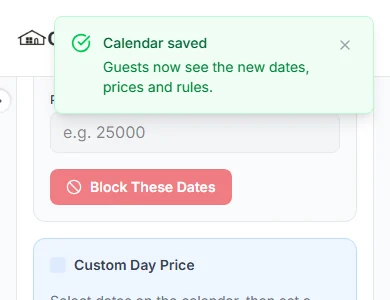
Prepare one listing per independently bookable room or apartment. Cabans does not pool identical room types or allocate the next spare room. If you accept bookings elsewhere, update each source yourself: there is no iCal or calendar sync.
Online booking payments
Problem: Reception tries to match a payment screenshot to a guest and a set of dates.
Cabans feature: The Cabans short let booking flow takes the guest through dates and online payment.
Result: The stay and payment belong to the same booking journey, so staff can check the record rather than relying on forwarded messages.
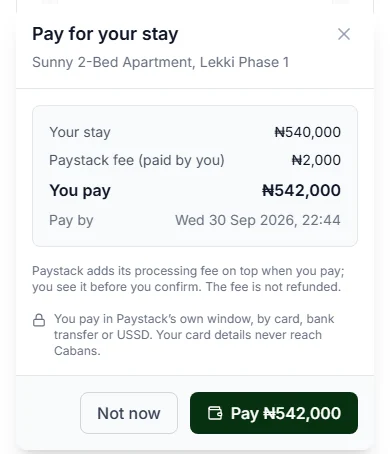
Decide whether paid bookings confirm through instant book or need your answer. Show reception the difference between an enquiry and a booking. See the host payment guide for the full payment terms before changing your procedure.
Guest requests tied to the stay
Problem: A request for cleaning or help disappears between reception and the person on duty.
Cabans feature: Guests can send room service, cleaner, help or issue requests from their stay page; the host sees guest requests on the booking.
Result: The request has the context of the stay and a status your team can update as it is handled.
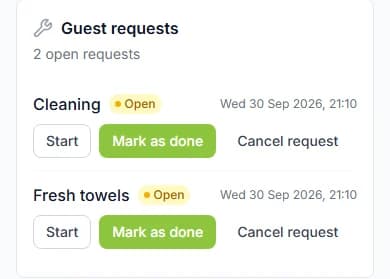
A request is a prompt for your team to act, not a promise that someone has been dispatched. Agree who checks requests, who contacts the guest and who marks the work complete. Cabans does not create housekeeping rotas.
Stay extras and Bill the guest
Problem: Breakfast, water and other agreed extras are delivered but forgotten when it is time to settle.
Cabans feature: Set up stay extras for the relevant properties and use Bill the guest on the booking for items the guest has used.
Result: A guest can pay for the offered extras through their stay instead of the team keeping a loose cash list.
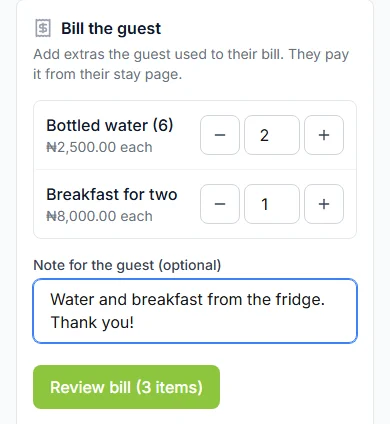
Only offer extras you can deliver. Checked-in guests see eligible stay extras; they are not a public restaurant shop. Stock is not reduced automatically when an order is placed, so the team must keep the available quantity accurate.
Read the full terms in the guide to taking bookings online and practise the handover in managing short let bookings. If this model fits your rooms, start a property listing with accurate photos and existing commitments ready to enter.
Hotel management system gaps to plan around
Room-type inventory and room allocation
If a guest buys a room type and reception chooses the actual room later, you need to assess inventory pooling and room allocation explicitly. Cabans' unit model is not that workflow. Do not put a building's full room count behind a single listing and assume each booking will consume one room from the count. A room shown as available must be a unit you can actually provide.
Restaurant POS and stock control
A restaurant may need table orders, kitchen tickets, till reconciliation, stock deductions and reporting across guests and walk-in diners. Cabans stay extras and guest bills do not make it a POS. If food service is a substantial part of your operation, show the person choosing software how an order moves from the waiter to the kitchen and then to payment. Test that entire path separately.
Housekeeping rotas
A cleaner request from a guest and a plan for cleaning every departing room are different jobs. Cabans has guest requests, but no housekeeping rotas. Decide who assigns cleaning, who inspects the room and how reception learns it is ready. Keep a visible working list or choose a system that supports the scheduling you need. A departure time alone is not a clean-room confirmation.
Channel management and calendar sync
Cabans does not send inventory to other booking sites and does not import their reservations through calendar sync. If you sell the same unit in several places, manual updates are part of your daily process. Read the channel manager explanation when deciding whether that workload is manageable. Do not connect unsupported tools by assuming that a public listing link is a calendar feed.
Test a busy shift before moving the whole property
Ask the people who will use the system to work through concrete situations. You do not need customer identity documents or real payment details for a planning exercise. Use clearly fictional guest labels and a sample room checklist, then follow the process through the screens and help guides before accepting live bookings.
- A late booking: who checks that the unit is ready and who answers the request?
- A telephone reservation: who immediately closes those nights, and who checks the other booking sources?
- A room unavailable for repairs: who closes future dates and reviews any existing commitments?
- A guest asks for breakfast: who confirms availability, arranges delivery and checks the bill?
- A cleaner does not arrive: how does reception learn the room cannot be promised yet?
- The internet is unavailable: what secure handover information lets the team welcome guests already expected?
Record where a person must act manually. That does not automatically make a system unsuitable, but the manual work must have an owner and enough time. A process that depends on the proprietor replying to every message may need changing before you add more rooms or more places to advertise.
Make your software checklist specific to the property
Mark each requirement as essential, useful or unnecessary. An operator selling a handful of distinct apartments may prioritise accurate calendars and clear guest communication. A property with interchangeable bedrooms, a restaurant and several reception shifts may need a fuller PMS and POS arrangement. Compare the work each system removes with the work your team would still have to do.
For a Nigerian property, include practical service information in the assessment: water arrangements, backup power, arrival directions and the person guests can reach. Software cannot make an unavailable facility reliable. Describe the service you can provide, and train staff to correct an inaccurate promise before accepting another booking.
Use a controlled rollout. Prepare one unit, check its photos and description, close existing commitments and agree the handover. Only repeat the setup across the rest of the property once the people maintaining it understand their responsibilities. For a room-by-room example, follow the guest house booking system setup guide. For the public page guests follow, read hotel booking websites for small hotels.
Frequently asked questions
Is Cabans a hotel PMS?
No. Cabans provides unit-based short let bookings and related guest workflows. It does not provide pooled room inventory, a restaurant POS, housekeeping rotas, a channel manager or calendar sync.
Can a small hotel use Cabans?
It can fit a small operator selling specific rooms or apartments as separate short let units. Each independently bookable unit needs its own listing and calendar. Check the wider requirements of your hotel before treating it as your main operating system.
Can I manage restaurant stock through stay extras?
Stay extras are for items or services offered to checked-in guests at linked properties. They are not a restaurant POS, and orders do not automatically reduce stock. You need your own stock-control process.
Choose the booking setup you can keep accurate
Return to the serviced apartment and small hotel booking system to review the supported workflows together. If you sell by the unit, list a room or apartment on Cabans and use the checklist before opening its dates. You can also browse serviced apartments in Lagos to check whether your listing gives guests enough detail to choose confidently.
Take the next step
Keep your research practical: search for property in Lagos, compare live options for properties in Lagos, or list your property on Cabans to reach active buyers and renters.
Not ready yet? Get an email when new listings go up in Lagos.