Paying
How to pay for your stay
The short answer
Pick "Pay now with Paystack". Check your stay. Press "Confirm and Pay", then pay in Paystack’s window.
Step by step
Step 1: Press "Proceed to Secure Checkout" in your basket.
Your basket is the page called "Shopping Cart". Your stay must be the only thing in it.
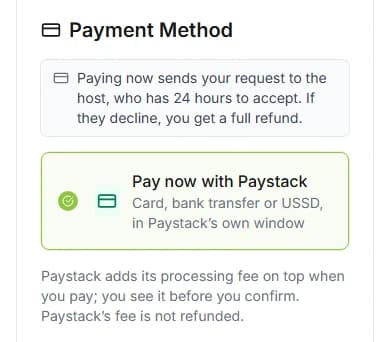
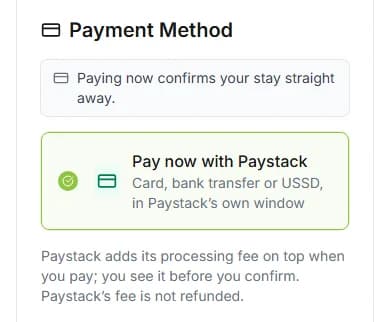
Step 2: Pick "Pay now with Paystack" on the "Payment" step.
Under it, it says "Card, bank transfer or USSD, in Paystack’s own window". Paystack is the company that takes payments for stays.
Step 3: Press "Continue".
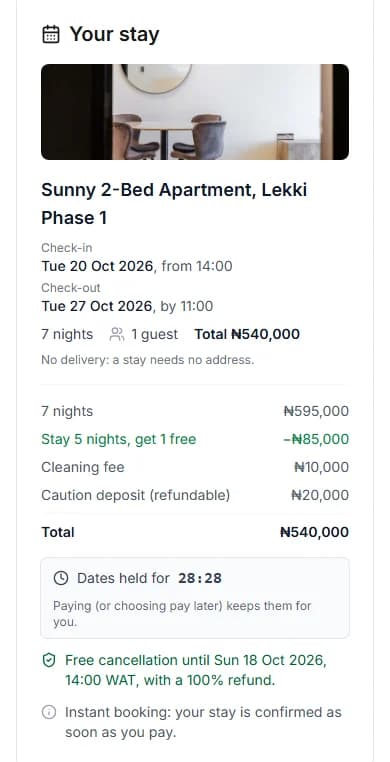
Step 4: Check "Your stay" on the "Review & Confirm" step.
Look at your dates, your guests and the "Total". Read the line about free cancellation too.
Good to know: The timer shows how long we keep your dates. Pay before it ends.
Step 5: Press "Confirm and Pay".
A box opens. It is called "Pay for your stay".
Step 6: Check the amounts in the box.
"Your stay" is the price. "Paystack fee (paid by you)" is Paystack’s small charge. "You pay" is the two together.
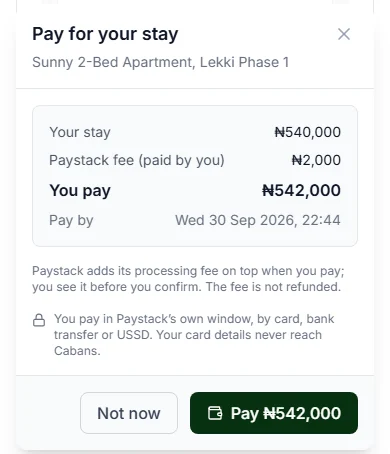
Step 7: Press the "Pay" button.
It shows the amount, like "Pay ₦…". Paystack’s window opens.
Step 8: Pay in Paystack’s window.
Use a card, a bank transfer or USSD. USSD means paying with a code you dial on your phone. When you finish, the page carries on by itself.
Good to know: Your bank may ask you to confirm the payment. Do that in Paystack’s window.
Do it now
Host confirms, or instant booking?
Read the note at checkout. It tells you what happens when you pay.
| The note says | What it means |
|---|---|
| The note says"Paying now sends your request to the host, who has 24 hours to accept. If they decline, you get a full refund." | What it meansThe host must say yes first. If they say no, you get your money back. |
| The note says"Paying now confirms your stay straight away." | What it meansYour stay is booked as soon as you pay. |
Good to know
- You do not type an address. The page says "No delivery: a stay needs no address."
- You pay in naira (₦), the money the stay was priced in.
- The Paystack fee is not refunded. See what the Paystack fee is.
- Your card details never reach Cabans.
Closed the box before you paid?
You see "Your stay is not paid yet". Your dates are kept for a while.
Press "Pay now" to try again. Or press "Go to your stay" and pay from there.
Not ready to pay now?
Pick "Pay After Checkout" instead. You then pay within 2 hours from your stay page.
How to reserve now and pay later shows you how.
Questions people ask
Can I use a card I saved before?
No. For a stay, you always pay in Paystack’s own window.
Is my money taken before the host says yes?
Yes. You pay first, then the host answers. If they say no, you get back everything you paid for the stay.
Can I pay for my stay and other things together?
No. A stay is paid for on its own. Save the other things for later, then add them back after.
What if I close the page after paying?
You lose nothing. Paystack tells us about your payment by itself. Open My Stays to see your stay.
Can I pay with PayPal?
No. A stay is paid through Paystack only.
Read next
- PayingWhat is the Paystack fee?Paystack takes your payment. It adds a small fee on top of the price. You see the fee before you pay.
- PayingHow to reserve now and pay laterPick Pay later. You get a bill. Pay it within 2 hours, or the dates go back on sale.
- PayingWhat to do if your payment did not go throughIf the page says nothing was taken, nothing was taken. Read the message, then press the button under it.
- PayingWhat happens after you paySome homes say yes straight away. Others ask the host first. If the host says no, you get your money back.
More on Cabans
Still stuck?
Tell us what happened. If you have a booking number, add it. Our team will help.
Contact usLast updated