Paying
How to reserve now and pay later
The short answer
Pick Pay later. You get a bill. Pay it within 2 hours, or the dates go back on sale.
Step by step
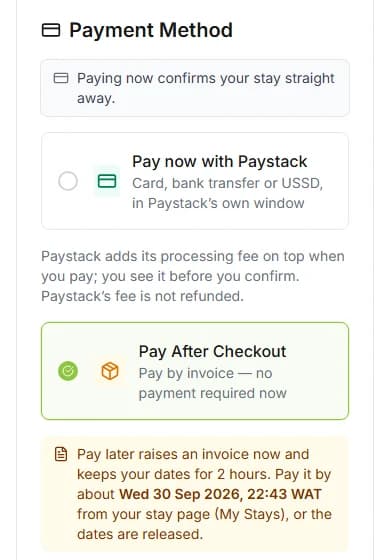
Step 1: Choose "Pay After Checkout" at checkout.
Under it, it says "Pay by invoice — no payment required now". An invoice is a bill. The note shows the time to pay by.
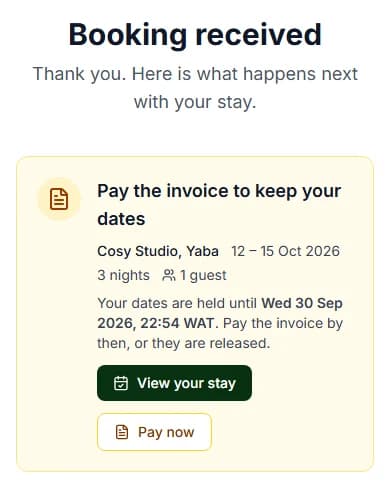
Step 2: Press "Reserve and Pay Later".
Nothing is charged yet. Your stay now says "Awaiting payment".
Step 3: Open My Stays.
It is in My Account, under "MY ORDERS". Then open your stay.
Step 4: Press "Pay now".
A payment box opens. It is called "Pay for your stay". It shows "Pay by", the time to pay by.
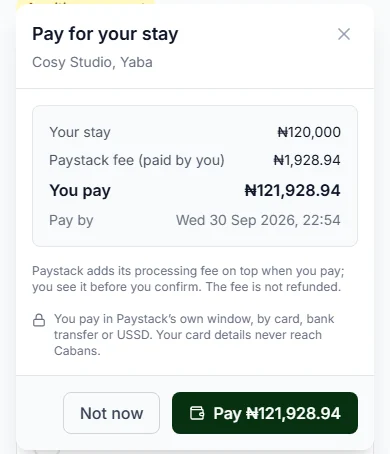
Step 5: Check "You pay".
It is your stay plus the "Paystack fee (paid by you)". Paystack is the company that takes the payment.
Step 6: Press the "Pay" button and pay in Paystack’s window.
Use a card, a bank transfer or USSD. Do it before your 2 hours run out.
Good to know: Your bank may ask you to confirm the payment. Do that in Paystack’s window.
Do it now
Other places to press "Pay now"
- On the page you see right after checkout. It says "Pay the invoice to keep your dates".
- In your basket, next to your stay.
When does the host see my booking?
Only after you pay. Your request reaches the host once the bill is paid.
What if I do not pay in time?
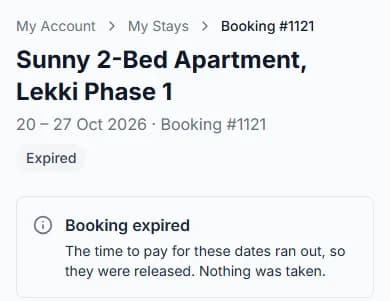
The dates go back on sale. Nothing is taken.
Your stay page says "Booking expired". We email you too. The subject is "Your booking at [home name] lapsed".
You can book again if the dates are still free.
Changed your mind?
You can cancel an unpaid booking at any time. Open your stay and press "Cancel booking".
You paid nothing, so there is nothing to give back.
Questions people ask
How long do I have to pay?
2 hours. The page and our email show the exact time to pay by.
Is anything charged when I pick Pay later?
No. You pay when you press "Pay now" and finish in Paystack’s window.
Can I pay the bill by bank transfer?
Yes, in Paystack’s window. A transfer can take a few minutes to arrive. The page updates by itself, so do not pay twice.
Which email do I get?
The subject is "Pay by [time] to keep your stay". It shows the time to pay by.
Read next
- PayingHow to pay for your stayPick "Pay now with Paystack". Check your stay. Press "Confirm and Pay", then pay in Paystack’s window.
- PayingWhat is the Paystack fee?Paystack takes your payment. It adds a small fee on top of the price. You see the fee before you pay.
- PayingWhat to do if your payment did not go throughIf the page says nothing was taken, nothing was taken. Read the message, then press the button under it.
- Changing or cancellingHow to cancel a bookingCancel before the free-cancellation time. You get back all you paid for the stay, deposit too.
More about paying
Still stuck?
Tell us what happened. If you have a booking number, add it. Our team will help.
Contact usLast updated