Paying
What happens after you pay
The short answer
Some homes say yes straight away. Others ask the host first. If the host says no, you get your money back.
Step by step
Step 1: Read the "Booking received" page.
You see it right after you pay. We also send you an email.
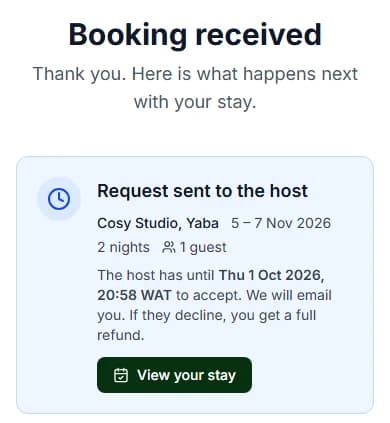
Step 2: Press "View your stay".
This opens your stay page in My Stays.
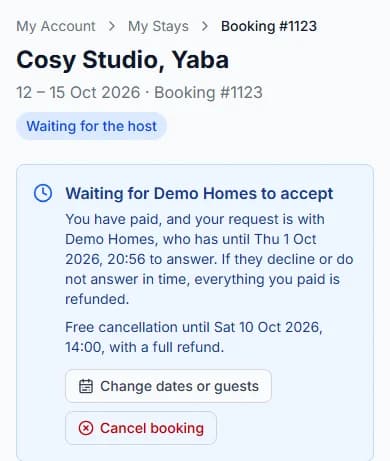
Step 3: Check what your stay says.
"Confirmed" means you are booked. "Waiting for the host" means the host must say yes first.

Step 4: Wait for our email if the host must answer.
Your stay page shows the time the host must answer by.
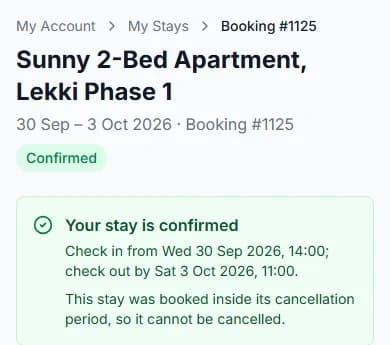
Step 5: Open your stay page once it says "Confirmed".
The address and how to check in are there. So are the house rules.
Do it now
Instant booking or host confirms?
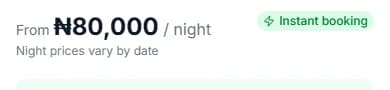
The booking box shows a badge before you pay.
With "Instant booking", your stay is confirmed as soon as you pay.
With "Host confirms", the host must say yes first.
How long does the host have to answer?
Each host picks a time. It can be 2 hours, or up to 7 days (one week).
The usual time is 24 hours (one day). Your stay page shows the exact time for your booking.
What if the host says no?
Your stay says "Declined by the host". You get back everything you paid for the stay.
It is the same if the host does not answer in time.
The Cabans team sends your refund and emails you. The email says "Refunds reach you within 14 days, usually in about 5."
Paystack’s fee is not refunded. That is the small fee Paystack added when you paid.
Emails you get
| When | The email subject |
|---|---|
| WhenYou paid, and the host must answer | The email subject"We have your payment for [home name]" |
| WhenYou paid for an instant booking | The email subject"Your stay at [home name] is confirmed" |
| WhenThe host said yes | The email subject"[host name] accepted your stay" |
| WhenThe host said no | The email subject"Your booking at [home name] was declined" |
| WhenThe host did not answer in time | The email subject"Your booking at [home name] was not accepted in time" |
Questions people ask
When do I get the address?
On your stay page, once your booking is confirmed.
Is my money taken before the host says yes?
Yes. You pay first. If the host says no, or does not answer in time, you get back what you paid for the stay.
Can I cancel while I wait for the host?
Yes, before the free-cancellation time. You get back everything you paid for the stay. See how to cancel a booking.
Do I have to do anything while I wait?
No. We email you when the host answers. Your stay page changes too.
Read next
- Before you arriveHow to find your booking in My StaysAll your stays live in "My Stays". Tap one to see everything about it.
- Changing or cancellingHow refunds workWhen you are owed money, the Cabans team sends it back to you. It arrives within 14 days, usually in about 5.
- Changing or cancellingHow to cancel a bookingCancel before the free-cancellation time. You get back all you paid for the stay, deposit too.
- PayingWhat is the Paystack fee?Paystack takes your payment. It adds a small fee on top of the price. You see the fee before you pay.
More about paying
- How to pay for your stayPick "Pay now with Paystack". Check your stay. Press "Confirm and Pay", then pay in Paystack’s window.
- How to reserve now and pay laterPick Pay later. You get a bill. Pay it within 2 hours, or the dates go back on sale.
- What to do if your payment did not go throughIf the page says nothing was taken, nothing was taken. Read the message, then press the button under it.
Still stuck?
Tell us what happened. If you have a booking number, add it. Our team will help.
Contact usLast updated