Before you arrive
How to find your booking in My Stays
The short answer
All your stays live in "My Stays". Tap one to see everything about it.
Step by step
Step 1: Sign in to your account.
Step 2: Open My Account.
Then press "MY ORDERS", then "My Stays".
Step 3: Pick a tab.
Pick "Upcoming" for stays still to come. Pick "Current" for stays happening now. Pick "Past" for stays that are over.
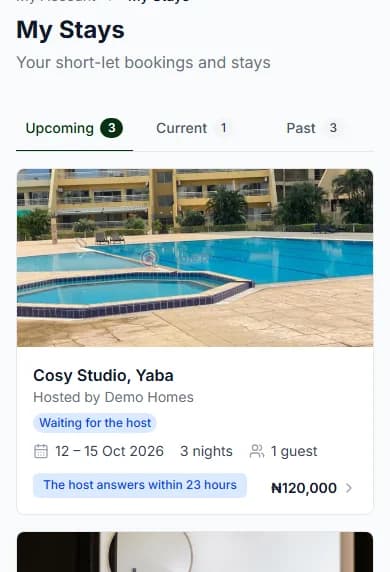
Step 4: Tap a stay to open its page.
Each card shows the home, your dates, your guests and where your booking is.
Do it now
What is on your stay page?
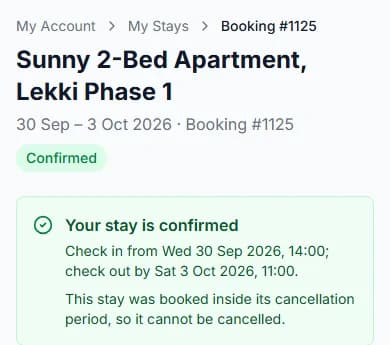
- Where your booking is, like "Confirmed" or "Waiting for the host".
- Your dates, your guests and your booking number.
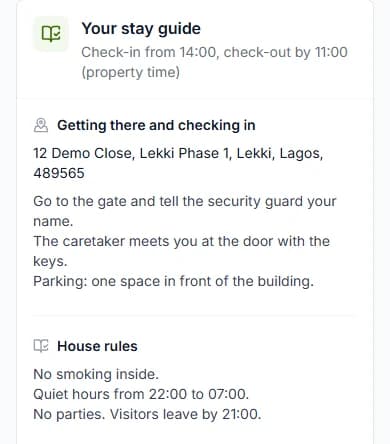
- "Your stay guide": how to get there, and the house rules.
- "Your ID", only if the host asks for it.
- "My bill", for extras and anything your host adds.
- "Progress", which shows each step of your stay so far.
- "Extend my stay", while you are checked in. How to extend your stay
- "Approve payment", after you check out. How to approve payment
- "Message [host name]", like "Message Ada". It opens a chat with your host.
Your stay guide
Your host writes it. It has "Getting there and checking in" and "House rules".
From check-in, it also has "Before you leave". That is your host’s list for the last day.
The address shows once your booking is confirmed.
The "Past" tab
It has two parts. "Your stays" are the stays you had.
"Cancelled, declined and expired" are the ones that did not happen.
Booked for a business?
Switch to that business profile first. Its stays are in that business’s own "My Stays".
You may see "We could not find that stay — It may belong to another of your profiles, or the link may be wrong." Switch profile, then look again.
Questions people ask
My stay starts today but is not confirmed yet. Where is it?
Under "Upcoming". It moves along once the host says yes.
Where is my booking number?
Open your stay. It is on the card at the side, with your dates and guests.
Why can’t I see a stay I booked?
It may be on another of your profiles. Switch profile, then open "My Stays" again.
I have no stays yet. What do I see?
An empty tab shows "Find a short let". Press it to start looking.
Read next
- Before you arriveHow to send your ID when a host asksSome homes ask for your ID. Add a clear photo of it. Only your host and our team can see it.
- During your stayHow to check in when you arriveWhen you get there, press "I have arrived". Your host gives you the keys, then checks you in.
- Changing or cancellingHow to change your dates or number of guestsPick new dates. Small changes happen at once. Bigger changes need your host to say yes.
- PayingWhat happens after you paySome homes say yes straight away. Others ask the host first. If the host says no, you get your money back.
Still stuck?
Tell us what happened. If you have a booking number, add it. Our team will help.
Contact usLast updated