During your stay
How to extend your stay
The short answer
Pick a new check-out date and ask your host. If your host says yes, pay for the extra nights. Then your stay is longer.
Step by step
Step 1: Open your stay while you are checked in.
Your stay must say "Checked in". You can only ask once your host has checked you in.
Step 2: Find the card "Extend my stay".
It says "Want to stay longer? Choose a new check-out date."
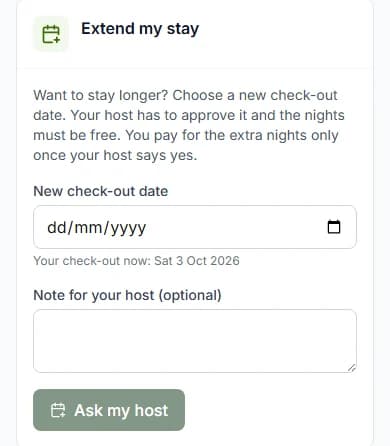
Step 3: Pick a date in "New check-out date".
This is the new day you would leave. Under it you see your check-out now.
Step 4: Read the price.
The first line says how many nights more, like "2 nights more, until …". Then "Paystack fee (paid by you)". The last line is "You would pay".
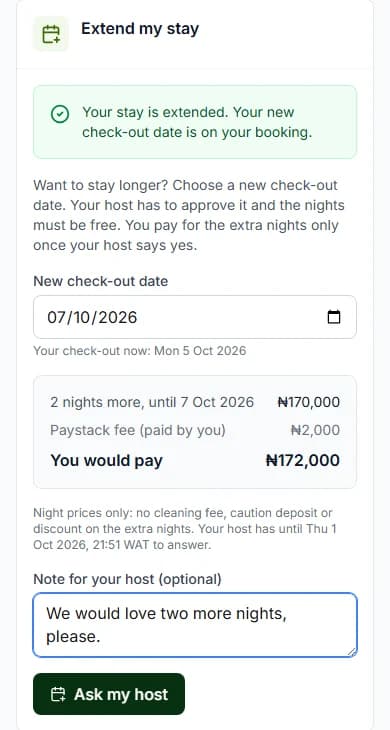
Step 5: Write a note for your host, if you like.
The box is called "Note for your host (optional)".
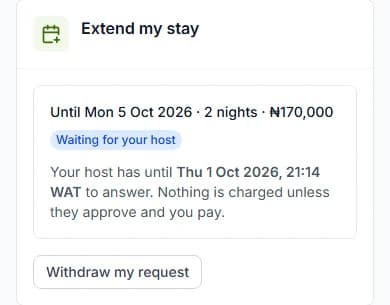
Step 6: Press "Ask my host".
The card now says "Waiting for your host". It shows the time your host must answer by.
Good to know: Nothing is charged yet. You only pay if your host says yes.
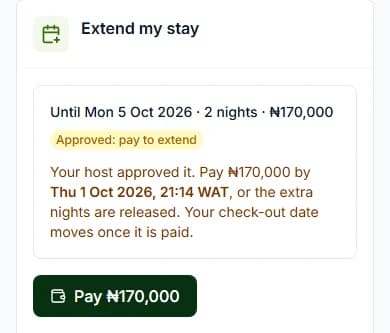
Step 7: Pay when it says "Approved: pay to extend".
Press the "Pay" button. It shows the amount. You pay through Paystack, like any bill.
Do it now
What the extra nights cost
You pay the home’s night prices for those nights.
The card says "Night prices only: no cleaning fee, caution deposit or discount on the extra nights."
Paystack adds its small fee on top. You see it before you pay.
How long you have
- Your host usually has 24 hours (one day) to answer. It is never later than your check-out now.
- Once your host says yes, pay within 24 hours. If you check out sooner, pay before check-out.
- The card shows the exact time for each one.
What the card can say
| The card says | What it means |
|---|---|
| The card says"Waiting for your host" | What it meansYour host has not answered yet. |
| The card says"Approved: pay to extend" | What it meansYour host said yes. Pay before the time shown. |
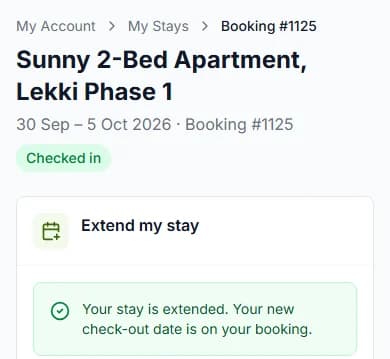
| The card says"Your stay is extended. Your new check-out date is on your booking." | What it meansYou paid. Your stay is now longer. |
| The card says"Your host could not extend your stay. Nothing was charged." | What it meansYour host said no. |
| The card says"The request lapsed before it was answered or paid, so the extra nights were released. Nothing was charged." | What it meansTime ran out. Your stay keeps its old dates. |
Changed your mind?
Press "Withdraw my request". You can do this until you pay. Nothing is charged.
Good to know
- The nights you want must be free.
- Your whole stay must fit the home’s longest stay.
- You can ask for one extension at a time.
- The extra nights also show in "My bill" as "Stay extension".
Questions people ask
Can I extend before I arrive?
No. Before you arrive, use "Change dates or guests" instead. See how to change your dates.
Do I pay the cleaning fee again?
No. You pay only the night prices for the extra nights, plus Paystack’s fee.
What if I do not pay in time?
The extra nights go back on sale. Your stay keeps its old check-out date. Nothing is charged.
Which emails do I get?
If your host says yes, "Your stay at [home name] can be extended". Once you pay, "Your stay at [home name] is extended". If your host says no, "Your extension at [home name] was not approved".
Read next
- During your stayHow to order extras and pay your billYour host may sell things like bottled water. Add them to your basket and pay. Your host brings them to you.
- PayingWhat is the Paystack fee?Paystack takes your payment. It adds a small fee on top of the price. You see the fee before you pay.
- Changing or cancellingHow to change your dates or number of guestsPick new dates. Small changes happen at once. Bigger changes need your host to say yes.
- Leaving and your caution depositHow to check outBefore you go, press "I am leaving". Your host checks the home and finishes your stay.
More about during your stay
- How to check in when you arriveWhen you get there, press "I have arrived". Your host gives you the keys, then checks you in.
- How to see your door code and Wi-Fi passwordOnce you are checked in, tap to see the code. It hides again after one minute to keep it safe.
- How to ask your host for help during your stayNeed towels, cleaning or a fix? Pick what you need, write a note and send it to your host.
Still stuck?
Tell us what happened. If you have a booking number, add it. Our team will help.
Contact usLast updated