During your stay
How to ask your host for help during your stay
The short answer
Need towels, cleaning or a fix? Pick what you need, write a note and send it to your host.
Step by step
Step 1: Open your stay.
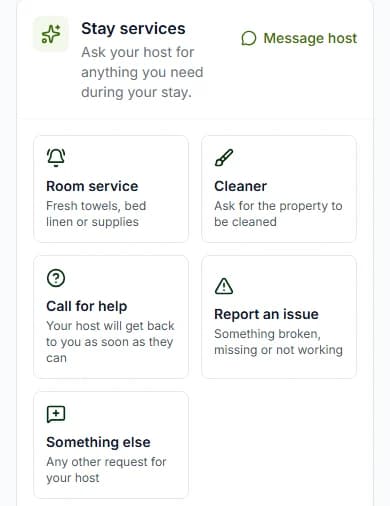
Step 2: Find "Stay services".
It says "Ask your host for anything you need during your stay."
Step 3: Pick what you need.
Tap one of the five tiles. The table below says what each one is for.
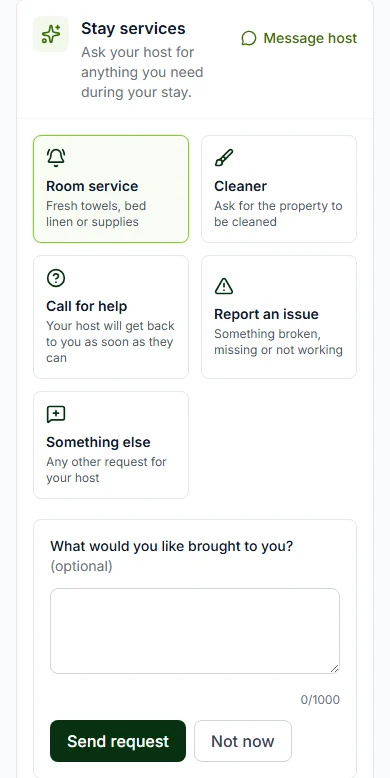
Step 4: Write a note.
Say what you need and where. For example, the kitchen tap is dripping. Some tiles need a note.
Step 5: Press "Send request".
Changed your mind? Press "Not now".
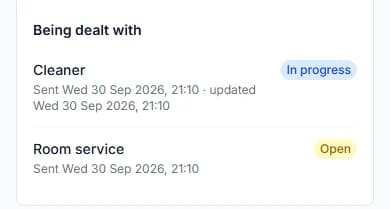
Step 6: Watch your request.
It moves from "Open" to "In progress" to "Done".
Do it now
The five tiles
| Tile | Use it for |
|---|---|
| Tile"Room service" | Use it forFresh towels, bed linen or supplies. A note is optional. |
| Tile"Cleaner" | Use it forAsking for the home to be cleaned. A note is optional. |
| Tile"Call for help" | Use it forWhen you need your host to get back to you. Add a note. |
| Tile"Report an issue" | Use it forSomething broken, missing or not working. Add a note. |
| Tile"Something else" | Use it forAny other request for your host. Add a note. |
Before your host checks you in
Once you have the keys, two tiles work: "Report an issue" and "Something else".
The other three open once your host completes your check-in.
Good to know
- We do not email you when your host updates a request. Look at the list on your stay page.
- You can have up to 10 open requests at a time.
- Requests close 2 hours after your check-out time.
- A request can also say "Cancelled".
- To chat with your host, press "Message host" at the top of "Stay services".
Questions people ask
Why can’t I press "Cleaner"?
It opens once your host completes your check-in. Until then, use "Something else".
How do I know my host has seen my request?
Look at your list. "In progress" means your host is on it. "Done" means it is finished.
Does my host get my request?
Yes. We email your host each time you send one.
Can I just chat with my host?
Yes. Press "Message [host name]" on your stay page, like "Message Ada".
Read next
- During your stayHow to order extras and pay your billYour host may sell things like bottled water. Add them to your basket and pay. Your host brings them to you.
- During your stayHow to check in when you arriveWhen you get there, press "I have arrived". Your host gives you the keys, then checks you in.
- During your stayHow to see your door code and Wi-Fi passwordOnce you are checked in, tap to see the code. It hides again after one minute to keep it safe.
More about during your stay
Still stuck?
Tell us what happened. If you have a booking number, add it. Our team will help.
Contact usLast updated