Free short-let management software for Nigerian hosts
Run your calendar, online bookings, check-in, caution deposits and team on Cabans. Use the booking tools free, with booking charges explained before you start.
When every stay lives in a separate chat, arrivals and deposits are easy to miss. Cabans groups bookings into Requests, Upcoming, Arriving, In house, Leaving, Past and Cancelled. Use the Property filter for one home or all your properties. Unsettled caution deposits remain with the finished bookings in Past.
You can see which request needs an answer, who is arriving, who is staying and which check-out needs attention. Follow the six steps of managing a stay for the actions in each tab.
The booking queues, with Requests selected. Scroll sideways to see all the tabs.
What the short-let booking software helps you do
A calendar for every short let
The problem
Dates agreed in messages are easy to overlook when another guest asks for the same nights.
On Cabans
Online bookings are on by default. Close nights you cannot host, then save your calendar. Choose instant book to confirm paid bookings straight away, or accept or decline each paid request.
The result
Guests choose from the dates you have left open. Block bookings taken elsewhere yourself: Cabans does not sync with other calendars.
Chasing a transfer screenshot makes it hard to know which enquiry has become a paid booking.
On Cabans
A booking request only reaches you once the guest has paid online through Paystack. Accept it to confirm the stay, or decline it and the guest is refunded in full. With instant book on, paid bookings are confirmed without you.
The result
You can act on paid requests from your Bookings page rather than trying to match screenshots to chats.
Check-in information without sending codes in messages
The problem
Repeating directions and sending a door code before arrival puts private access details in old conversations.
On Cabans
Save house rules, arrival instructions and the Wi-Fi network name once for each property. Guests see these from confirmation. The door code and Wi-Fi password appear only after you approve check-in, disappear after check-out and are never emailed.
The result
Guests find the information for their stay in one place, with access codes shown only while they are checked in. You still arrange the keys or lockbox and approve their arrival.
A disagreement about damage is harder to resolve when neither side can show how the home looked.
On Cabans
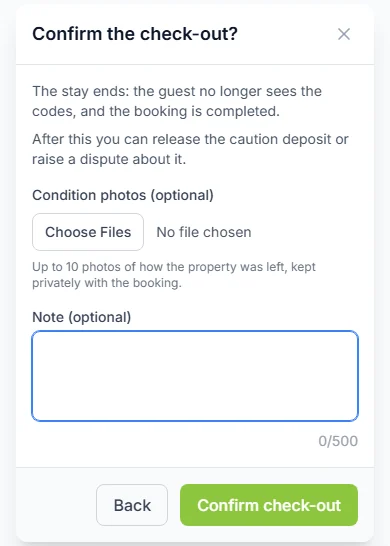
Add check-in and check-out photos to the booking. After the stay, release the caution deposit if all is well, or raise a dispute with your evidence for the Cabans team to decide.
The result
The deposit decision follows the booking record and condition evidence instead of an argument across separate messages.
Breakfast, bottled water or a pick-up can be forgotten when orders and cash payments sit outside the stay record.
On Cabans
Set up Stay Extras and choose the properties that offer them. Checked-in guests can order from their stay page. Use “Bill the guest” for agreed extras they have used, so they can pay from that page.
The result
Your team has a clear record of the extra and its payment. You or your team supply and deliver it to the guest.
A request for a cleaner or help with a problem can get buried in a busy chat.
On Cabans
Guests can ask for room service, a cleaner, help, report an issue or send another request from their stay page. Your team gets an email for each request, and can use “Start” and “Mark as done” to track the response.
The result
The people looking after the home can see what needs attention. Cabans records the request; your team does the work on site.
Sharing the owner’s password makes it difficult to control who can act on a booking.
On Cabans
Add individual team users and assign roles. Read-only order access lets a person view bookings and the calendar; processing access lets them answer requests, manage check-in and see door codes. Read-only access also includes Earnings, so review the full permissions before inviting staff.
The result
Each person signs in with their own account and works within the permissions you give them. The role bundles are broader than a calendar-only or door-code-only permission.
Asking guests to send identity documents through unrelated chats spreads sensitive files around.
On Cabans
If you need ID, turn on “Guests must upload an ID” in Stay information. Guests upload it through their stay page; access is restricted to authorised people in your host team and Cabans, and documents are kept securely.
The result
Your team can review the submitted document before approving check-in. An upload is not a guarantee that a guest’s identity has been independently verified.
Paystack's fee for handling the payment is paid by the guest, not by you. You are paid within 7 days after the stay, and sooner when the guest approves the payment after their trip.
Add your bank account so we can pay you. Your payout waits until you add it.
What Cabans does not cover
There is no calendar sync with other sites and no channel manager. Update availability yourself on every site where you take bookings. Cabans does not provide a point-of-sale system or housekeeping rotas; organise your on-site cleaning and handovers with your team.
Cabans supplies the marketplace and booking tools. You or your property manager operate the short let and look after guests.
Start with one short let
1. List your short let
Start with your property details, accurate photos, nightly price and house rules on Cabans.
2. Set availability and booking rules
Bookings are on by default. Close unavailable nights, choose instant book or booking requests, and save your calendar.
3. Prepare for arrival
Save stay information, arrange the keys and give your local team the permissions they need.
4. Run each stay
Use Bookings to answer paid requests, approve check-in, respond to guests, confirm check-out and settle the caution deposit.
The calendar and booking management tools are free to use. Booking commission and payment processing terms still apply. Read “Take shortlet bookings online” for the booking charges and payout terms before taking a booking.
When does the host receive the booking payment?
You are paid within 7 days after the stay, and sooner when the guest approves the payment after their trip. Add your bank account so we can pay you. Your payout waits until you add it.
Who pays the payment processing fee?
Paystack's fee for handling the payment is paid by the guest, not by you.
Does Cabans sync calendars or work as a channel manager?
No. Cabans has no calendar sync with other sites and no channel manager. Block dates on your Cabans calendar whenever you accept a booking elsewhere, and update your other calendars when you take a Cabans booking.
When can guests see the door code and Wi-Fi password?
Only while checked in, after the host approves check-in. They are hidden again after check-out and never emailed. The Wi-Fi network name, house rules and arrival instructions are available from booking confirmation.
Does Cabans manage the property for me?
You, your staff or your property manager run the home. Cabans is the marketplace and booking tool. Your team prepares the home, welcomes guests, delivers extras and responds to guest requests.
Own a furnished home?
Get your home ready for guests and learn how to host on Cabans.

 Keep your short-let calendar accurate