
Looking for a shortlet app for hosts usually means you want to run the next stay without carrying a laptop. You need to see who is arriving, answer the right request and give your local team clear instructions. On Cabans, manage bookings from your phone’s browser. The host bookings app is coming.
This guide describes the browser workflow you can use now. It is part of our free short-let management software guide. You do not need an app download to begin, but you do need a connection, the correct business account and a person who can look after the physical home.
You will learn: how to organise a phone-based booking review, avoid acting on the wrong stay, keep arrival information useful and decide what still needs a local handover.
What to look for in a shortlet app for hosts
Start with the work rather than the app icon. A tool is useful when it tells you what needs attention and gives you a clear next step. An attractive home screen will not fix an unclear check-in arrangement or a calendar that you have forgotten to update after accepting a booking elsewhere.
Write a short list of your daily questions. Which guests are waiting for an answer? Who is due to arrive? Who is already in the home? Who is leaving? Which property does each task belong to? If you manage a home while travelling between Lagos and Abuja, that list is more useful than trying to remember the latest version of several chat threads.
Judge the limits as well. Cabans has no calendar sync with other sites and no channel manager. Do not assume installing an app will remove the need to maintain availability where else you advertise. Our guide to avoiding double bookings explains the discipline needed when enquiries arrive through more than one route.
Step 1: open the business dashboard in your browser
Open Cabans in the browser you normally use on your phone and sign in. Use the business that owns the short-let listing, then open Bookings from the seller menu. If you work with more than one business, check which one is active before deciding that a booking is missing. A personal account view and the business dashboard serve different jobs.
Save a browser bookmark if it helps you return to the same starting point. A bookmark is only a shortcut to the website; it does not add offline booking management or change your account permissions. Keep the phone locked when unattended, especially when you are using it at reception or sharing it with another person during a handover.
If your property is not on Cabans yet, start your short let first. Add accurate photos and practical information about the home. Managing a booking from your phone starts with a listing that tells the guest what you can actually provide.
Step 2: use the booking queues as your working list
The Bookings page groups stays into Requests, Upcoming, Arriving, In house, Leaving, Past and Cancelled. Select a property when you only want that home, or leave the filter on all properties for a wider review. The point is to make a deliberate pass through what needs attention rather than opening whichever message was most recent.
Problem: arrival and departure tasks get buried in separate messages on your phone.
Cabans answer: the browser Bookings page groups stays into queues and lets you filter by property.
Result: you can review the next task for each home from one starting point.
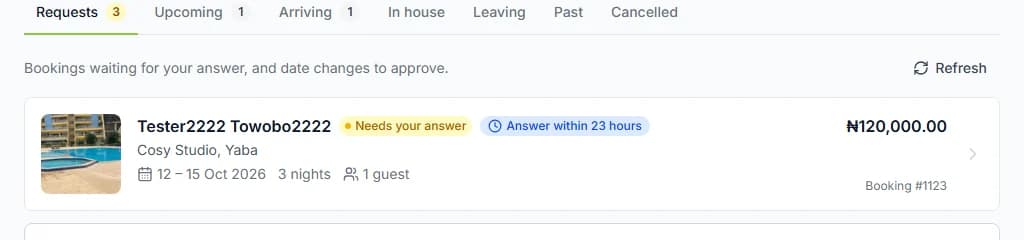
Begin with requests that need your decision, then check arrivals and departures. A stay already in progress still deserves a review, particularly when your local contact has reported a problem. Use the booking itself as the reference for the property, guest and dates; a short message may omit one of them.
For the exact meaning of each queue and the actions through the stay, read how to manage short-let bookings. Keep that workflow familiar before you need to use it during a busy turnover.
Step 3: check the booking before you tap an action
A small screen makes it tempting to move quickly. Pause long enough to confirm the home and booking dates, especially when one guest is leaving and another is arriving on the same day. Similar guest names and repeated bookings are a reason to read the details, not to rely on the order of a message list.
Use the actions available on that booking. If a connection drops while an action is finishing, reopen or refresh the booking to check its state before repeating it. A poor signal is not evidence that nothing happened. Avoid asking your local manager to repeat the same action at the same time while you are still checking the result.
Agree a simple ownership rule for a live arrival: one person carries out the booking steps, and the other provides the physical help. That makes it clearer who is responsible for the next action. A phone gives you access while away from a desk, but it should not create two people giving the guest different instructions.
Plan for an interrupted connection
Do your routine review before travelling through an area where your connection is unreliable. Make sure your local contact knows who is arriving and how to reach you. Do not rely on a page left open for hours as proof that a booking has not changed. When you reconnect, check the current booking before giving a new instruction to the guest or your team.
Keep the difference between a practical backup and a second booking record clear. A contact can know an expected arrival window without keeping screenshots of guest files on a shared phone. If you need to make a note for a handover, include the job and the minimum detail needed to identify the stay. Return to the live booking for its current state when the connection is available again.
Step 4: keep arrival information out of old chat threads
The property’s Stay information holds the house rules, arrival instructions, check-out notes and Wi-Fi network name. Confirmed guests can use that information on their stay page. The private door code and Wi-Fi password are separate: they appear only while the guest is checked in, after the host approves check-in, and are never emailed.
Problem: forwarding a saved arrival message can send an old entrance instruction or private code.
Cabans answer: save property-specific Stay information, with dedicated fields for the private codes.
Result: you can direct the guest to their stay page while keeping general instructions separate from access details.
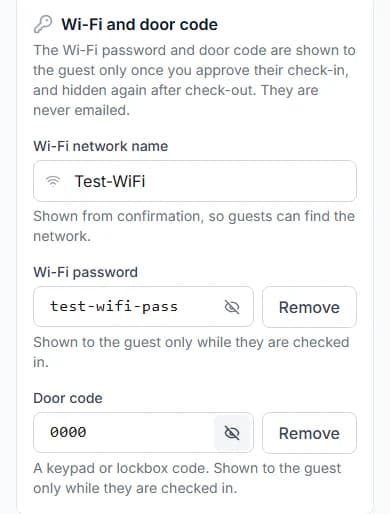
Review the notes after an entrance, parking or key arrangement changes. The shortlet self check-in guide explains why you must still test the route from the gate to the apartment. A page can hold the instructions, but it cannot open a broken lock or meet someone whose phone has run out of battery.
Give the local team a workable handover
Managing from a phone still needs people on the ground. Someone must check that the home is clean, the key works and the guest can enter. Decide who covers when the usual caretaker is away. A named backup is more useful than a general instruction to “call someone at the property”.
Give staff their own accounts when they need dashboard access. Before assigning a role, read shortlet staff access and roles. The permission groups have a wider scope than a single arrival task. If someone only needs to know when to clean, a limited practical handover may suit them better than access to booking files.
Keep a short record of unresolved practical work: a key to collect, an appliance to check or a guest question still awaiting a reply. Cabans does not provide housekeeping rotas, so plan shifts and cleaner assignments in your own routine. Avoid treating a booking queue as proof that the physical home has been inspected.
A daily phone-management checklist
- Open the correct business and check all relevant properties.
- Review requests, arrivals, current stays and departures.
- Confirm the home and dates before acting on a booking.
- Check the result after a weak connection interrupts an action.
- Keep arrival notes current and private codes in their dedicated fields.
- Confirm who is covering the next physical handover.
- Update availability yourself wherever else you accept bookings.
From the same browser you can search short lets in Lagos or browse short lets in Abuja to understand the information a guest sees before booking. Use that perspective when checking your own listing and arrival promise.
Frequently asked questions
Do I need to install a shortlet app to manage Cabans bookings?
No. Use Cabans in your phone’s browser and sign in to your business dashboard. The host bookings app is coming; use the browser workflow described here in the meantime.
Can I manage bookings without a laptop?
You can use the web booking pages from your phone’s browser. You still need internet access, a reliable local handover and permission for the actions you want to carry out.
Will Cabans sync calendars with other booking sites?
No. Cabans has no calendar sync or channel manager. If you also accept bookings elsewhere, keep availability up to date yourself before promising dates to another guest.
Does using a phone replace a local manager?
No. A phone helps you follow bookings and communicate, but someone still needs to prepare the home, handle physical access and help a guest when an on-site problem occurs.
Start with the browser workflow
The host bookings app is coming. For now, use Cabans in your phone’s browser and build a reliable routine around the next stay. Return to short-let management software on Cabans for the full feature guide, or list your short let and get the home ready for guests.
Take the next step
Keep your research practical: search for property in Lagos, compare live options for properties in Lagos, or list your property on Cabans to reach active buyers and renters.
Not ready yet? Get an email when new listings go up in Lagos.
Own a furnished home?
Get your home ready for guests and learn how to host on Cabans.