
Shortlet self check-in in Nigeria works when a guest can follow clear arrival steps and reach a person if something goes wrong. A keypad alone does not solve an estate gate that closes early, a building door with a separate key or a guest whose phone has run out of power. Plan the whole route from the street to the apartment.
Cabans keeps arrival information on the guest’s stay page, with the door code and Wi-Fi password shown only while they are checked in, never emailed. This guide is part of our free short-let management software guide. It explains what to prepare, how the information is separated and where a human handover still matters.
You will learn: how to write useful directions, separate private codes from general notes, complete check-in and prepare a backup for late arrivals.
Before you offer shortlet self check-in
Walk through the journey as if you had never visited. Start outside the estate rather than at your own front door. Check whether security needs a guest name, whether parking is assigned and whether the lift or stairwell is obvious after dark. Get any building or estate permission you need before advertising unattended arrival.
Decide what “self check-in” means for this particular home. It might mean collecting a physical key from a lockbox after a call, using a keypad after your team completes the booking steps, or meeting a caretaker at the building while entering the flat alone. Describe that arrangement accurately. Do not promise a fully unattended arrival if a guard or caretaker must first meet the guest.
- Test the key, lockbox or keypad and keep a working backup nearby.
- Choose a contact who can answer during the agreed arrival window.
- Tell the guest what to do if their journey is delayed.
- Check lighting, building access and phone reception at the entrance.
- Agree what security may be told, without circulating a guest’s ID photo.
If you are preparing your first home, start your short let on Cabans with an accurate description of the arrival arrangement. Guests should know whether they will meet someone before they book.
Step 1: write arrival information once
Repeating directions in separate chats creates different versions. A guest may follow last month’s gate instructions while your caretaker expects the new entrance. In the listing’s Stay information, save the house rules, arrival steps, check-out notes and Wi-Fi network name. Guests can see this information once their booking is confirmed.
Problem: directions and house rules are scattered across messages.
Cabans answer: the property’s Stay information holds the arrival notes, rules and check-out instructions in one place.
Result: you can point each confirmed guest to their stay page and keep the instructions consistent.
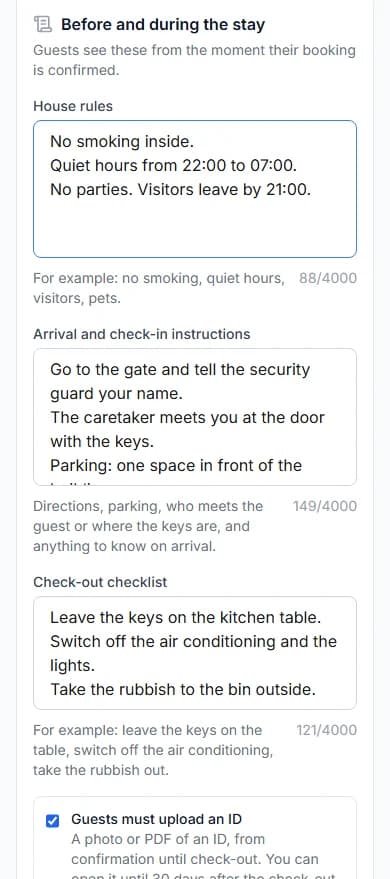
Write directions in the order the guest will use them: the correct estate entrance, what to say at security, where to park, how to find the building and which door is the apartment. Use landmarks that remain visible after dark. A shop sign that disappears when shutters close is a poor final landmark for a late arrival.
Keep the first instructions short enough to use while standing outside with luggage. Put the full house rules in their own section. For example: “Use the main estate gate. Give security the booking name. Follow the building sign to the entrance. Contact your host from your stay page if you cannot find it.” Replace that example with the actual route for your property.
Step 2: keep the door code out of general messages
A forwarded message can keep a code long after a stay ends. Put a keypad or lockbox code in the dedicated door-code field, and the Wi-Fi password in its own field. The Wi-Fi network name belongs with the general information; the password does not. Do not repeat either private code in a welcome note, listing description or email.
Problem: sending access details early leaves them in old chats and email threads.
Cabans answer: door code and Wi-Fi password appear on the stay page only while the guest is checked in, and are never emailed.
Result: the guest finds the private details in the same place during the stay, with access tied to check-in.
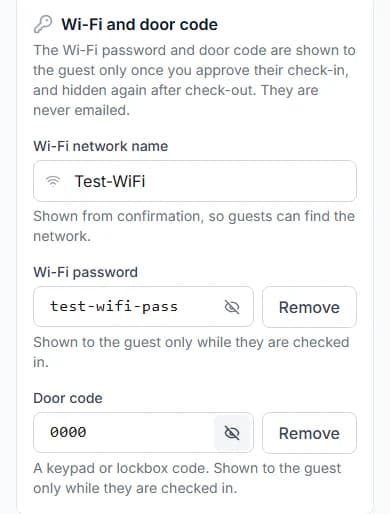
Cabans does not supply a lock or change its code. Hiding a code on a web page cannot make a code the guest has already seen stop working at the door. Your physical access routine still needs a plan for changing codes, collecting keys and dealing with a lost key. Keep a record of who is responsible for those jobs.
Step 3: finish the booking’s check-in steps
Access to the home and completion of check-in are related tasks. Follow the handover and approval steps shown on the booking when the guest arrives. Once you approve check-in, the guest can see the door code and Wi-Fi password on their stay page. Do not approve a check-in early just to send a code ahead of the agreed arrival.
Explain your arrangement before the journey. If the guest first needs a physical key, tell them who provides it. If a keypad is the only way into the home, agree the arrival contact and how your team will complete the check-in before they need the code. Test that sequence with your team so the guest is not left outside waiting for an owner who is asleep abroad.
Read how to give staff the right booking access before delegating this work. Permission to process bookings covers more than checking a guest in, so choose the person with care. Where you ask for ID, explain the requirement before booking and follow the guest ID guide.
Step 4: make late arrival a planned handover
Ask for an expected arrival window rather than assuming every guest comes straight from the airport. Traffic, a delayed flight or a stop with family can change it. State the latest time a person can help, what the guest should do if delayed and who is covering if the first contact cannot answer. Agree changes in writing.
A useful test is whether someone other than you can explain the plan. Ask your local contact to read the arrival notes and repeat the route back. Check that they know the correct property and booking date. Never give a visitor a code simply because they know the apartment name; match the arrival to the expected booking.
For a guest without data or battery, plan an alternative contact or a staffed meeting point. Avoid promising that every building service runs through a power cut. Check the actual arrangement for your entrance, lift and lock. A careful description prevents a guest confusing backup power inside the apartment with guaranteed access to every shared facility.
Keep the backup practical. The person holding the spare key should know which home it opens and when they are on duty. Check that the spare still works after a lock change. If a guest reports that the code fails, establish where they are standing before sending different instructions: the estate gate, building entrance and apartment door may each have a different arrangement. Agree who calls the guest back while another team member checks the access problem, so the guest knows someone is dealing with it.
Step 5: close the stay and reset physical access
Give the guest clear departure instructions: where to leave physical keys, how to secure the door and how to contact your team about a forgotten item. Complete check-out on the booking. The private codes are hidden again after check-out, but you must still deal with the physical key or lock code yourself.
Inspect the entrance as part of the turnover. A sticking lock, worn key or unclear apartment label can turn an otherwise good stay into an arrival problem. If you change access arrangements, update Stay information before the next guest travels. Keep the old instructions out of printed notes left in the home.
Shortlet self check-in checklist
- The guest knows whether anyone must meet them.
- Estate and building access have been checked.
- Arrival directions are saved and private codes use the dedicated fields.
- A named person covers the arrival and a backup can reach the home.
- The team knows when to hand over keys and approve check-in.
- Check-out includes collecting keys or resetting physical access.
You can search short lets in Lagos or browse short lets in Abuja to see how hosts describe their homes. Write your own arrival promise around what your team can reliably deliver, then use the Stay information help guide to save it.
Frequently asked questions
Does self check-in mean nobody has to be available?
No. A guest still needs a named contact if the gate, key or door fails. Agree a backup before arrival, and have someone able to reach the property if necessary.
When can the guest see the door code and Wi-Fi password?
On Cabans they are shown only while the guest is checked in, after the host approves check-in. They are hidden again after check-out and are never emailed.
Does Cabans supply or control a door lock?
No. You arrange the lock, keypad, lockbox or physical keys. Cabans provides the stay information and the booking’s check-in steps; it does not change your physical lock code.
Can I put the code in the arrival instructions?
Keep it in the dedicated door-code field. Arrival instructions are visible from booking confirmation, before check-in, so they should explain the route without revealing private access details.
Build a complete arrival routine
Self check-in is one part of running the stay. Return to short-let management software on Cabans for the full workflow, or list your short let when the home and arrival routine are ready. Our guide to managing a shortlet from abroad explains how to keep a local handover working when you are away.
Take the next step
Keep your research practical: search for property in Lagos, compare live options for properties in Lagos, or list your property on Cabans to reach active buyers and renters.
Not ready yet? Get an email when new listings go up in Lagos.
Own a furnished home?
Get your home ready for guests and learn how to host on Cabans.