Arrival and the stay
How to answer guest requests and bill extras
The short answer
Guests can ask you for things. Press "Start", then "Mark as done". If they used extras, send them a bill.
Step by step
Step 1: Open the booking and find "Guest requests".
You get an email for each request: "[guest name] needs [what they need] at [home name]".
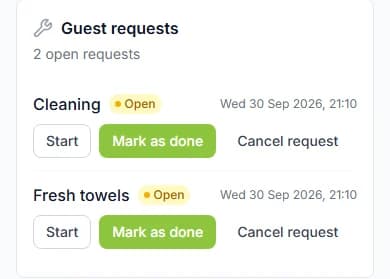
Step 2: Press "Start" when you begin.
Step 3: Press "Mark as done" when you finish.
Cannot help with it? Press "Cancel request".
Step 4: Open "Bill the guest" to charge for extras they used.
Pick how many of each extra. Add a "Note for the guest (optional)" if you like.
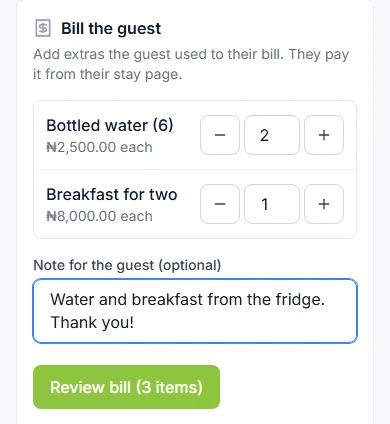
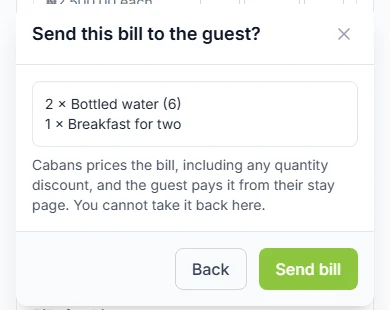
Step 5: Press "Review bill", then "Send bill".
A box asks "Send this bill to the guest?". Cabans works out the price. The guest pays it from their stay page, through Paystack.
Good to know: You cannot take a bill back once it is sent.
Do it now
About requests
- Guests can ask for "Room service", a "Cleaner", "Call for help", "Report an issue" or "Something else".
- "Done" and "Cancelled" are final.
- Guests are not emailed when you update a request. They see it on their stay page.
- A stay can have up to 10 open requests at once.
When you can send a bill
While your guest has the keys, is checked in, or is leaving.
Bill rules
- Add 1 to 20 different extras to one bill.
- Add 1 to 99 of each extra.
- Only extras that are on sale at this home show up.
- A bill must come to at least ₦1,000 (one thousand naira). A card cannot be charged less.
- Sent the same bill twice within 2 minutes? You get one bill, not two.
After the guest pays
A paid bill shows under "Orders" as a paid order.
It is also added to your payout for the stay, less the 5% commission.
Before it is paid, a bill is listed in "Bills for this stay". It only shows in the browser that sent it.
Messages you might see
| The message | What to do |
|---|---|
| The message"This bill comes to less than the smallest amount a card can be charged, so the guest could not pay it. Add more to it." | What to doThe bill is under ₦1,000. Add more extras to it. |
| The message"You need the View Products permission to bill extras. Ask the store owner." | What to doAsk the store owner to tick "Read Only" under "Products" in your role. |
Questions people ask
Can I bill for something that is not an extra?
No. You can only bill extras that are on sale at this home. Add it in "Stay Extras" first.
Where do I see a paid bill?
Under "Orders". It shows as a paid order.
Is my guest emailed when I update a request?
No. They see the new status on their stay page.
What is the smallest bill I can send?
₦1,000 (one thousand naira). A card cannot be charged less than that.
Read next
- Getting bookableHow to sell stay extras to your guestsAdd things guests can buy while they stay, like water or breakfast. Tick which homes sell them.
- Arrival and the stayHow to hand over keys and check your guest inWhen your guest arrives, give them the keys. Then press "Approve check-in". Only then do they see the door code.
- Your team and moneyHow to let your team manage bookingsAdd your team. Give each person a role with the right permissions. Then they can look after bookings for you.
More about arrival and the stay
More on Cabans
Still stuck?
Tell us what happened. If you have a booking number, add it. Our team will help.
Contact usLast updated