Arrival and the stay
How to approve or decline a stay extension
The short answer
Your guest wants to stay longer. Press "Approve extension" or "Decline". The stay is longer once they pay.
Step by step
Step 1: Look out for the email.
You get "A guest wants to extend their stay at [home name]". It says the new date, the price and your answer time.
Step 2: Open the booking.
Press "Answer the request" in the email. Or open "Bookings", then the "In house" tab.
Step 3: Read "The guest wants to stay longer".
You see "Check-out now", "Asked until", "Extra nights" and "Guest pays". The guest may add a note too.
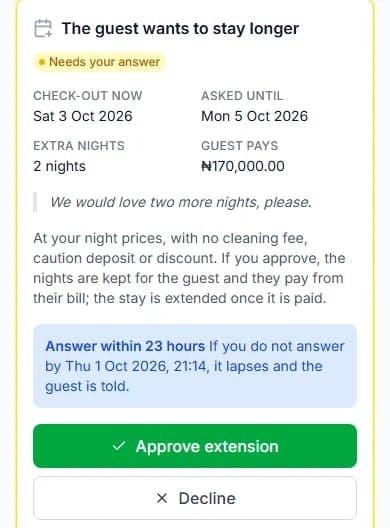
Step 4: Press "Approve extension" to say yes.
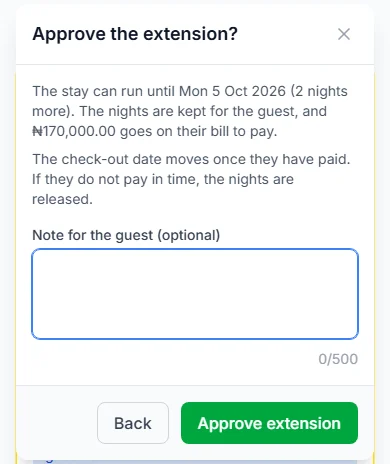
A box asks "Approve the extension?". Add a "Note for the guest (optional)" if you like. Press "Approve extension" again.
Good to know: The nights are kept for the guest. The price goes on their bill for them to pay.
Step 5: Or press "Decline" to say no.
A box asks "Decline the extension?". Keep your note short and polite. Press "Decline extension". Nothing is charged.
Do it now
What the guest pays
- Your night prices for the extra nights.
- No cleaning fee, no caution deposit and no discount on the extra nights.
- Paystack adds its small fee on top. The guest pays that too.
After you approve
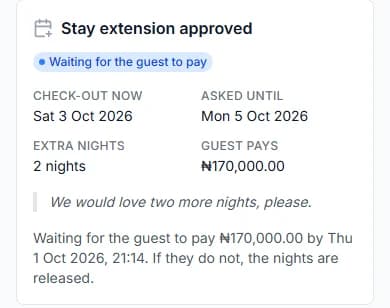
The panel says "Stay extension approved". It shows the time the guest must pay by.
The guest has 24 hours (one day) to pay. If check-out comes sooner, they must pay by then.
When they pay, the check-out date moves. You get "Stay extended: [home name]".
If they do not pay in time, the nights open again. You get "Extension not paid: [home name]".
Your time to answer
You have your usual answer time, often 24 hours. But it always ends by the current check-out.
If you do not answer in time, the request lapses. The guest is told. Nothing is charged.
When a guest can ask
- Only when they are fully checked in.
- Only for nights that are free in your calendar.
- Only if the whole stay fits your "Longest stay (nights)".
- One request at a time.
Messages you might see
| The message | What it means |
|---|---|
| The message"Some of those nights have just been booked by someone else." | What it meansAnother guest booked first. Press "Decline". |
| The message"There is no request to extend this stay waiting for your answer. The guest may have withdrawn it, or it lapsed." | What it meansThere is nothing to answer now. |
Questions people ask
Do I have to say yes?
No. You can decline. The guest keeps their current check-out date.
When do I get paid for the extra nights?
They are part of your payout for the stay, less the 5% commission.
Can the guest change their mind?
Yes. They can withdraw the request before they pay. The nights then open again.
Read next
- Arrival and the stayHow to answer guest requests and bill extrasGuests can ask you for things. Press "Start", then "Mark as done". If they used extras, send them a bill.
- Getting bookableHow to open, close and block datesAll days are open unless you close them. Pick the dates you cannot host, and block them.
- Your team and moneyHow to see your earnings and payoutsOpen "Earnings". It shows what each stay earned and what we pay you. We pay you 7 days after check-out, or sooner.
- Getting bookableHow to set your booking rules and instant bookChoose how guests book. Set the shortest and longest stay, the most guests and how far ahead. Then say yes yourself, or let instant book do it.
- During your stayHow to extend your stayPick a new check-out date and ask your host. If your host says yes, pay for the extra nights. Then your stay is longer.
More about arrival and the stay
More on Cabans
Still stuck?
Tell us what happened. If you have a booking number, add it. Our team will help.
Contact usLast updated