Getting bookable
How to open, close and block dates
The short answer
All days are open unless you close them. Pick the dates you cannot host, and block them.
Step by step
Step 1: Open the "Calendar" on your listing’s edit page.
It is in "Availability, prices and booking rules".
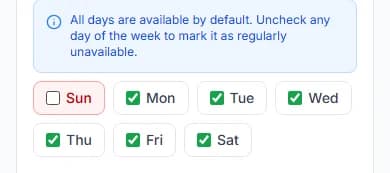
Step 2: Untick a weekday to close it every week.
The boxes run from Sun to Sat. All days are ticked at the start.
Step 3: Pick a start date and an end date to close some dates.
Tap the start date on the calendar. Then tap the end date.
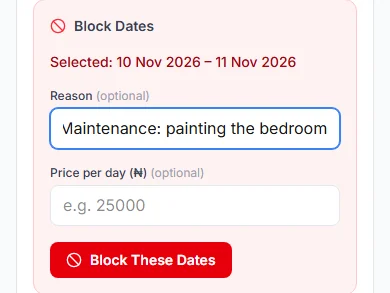
Step 4: Use "Block Dates" to close them.
Add a "Reason (optional)", like "Maintenance". Then press "Block These Dates".
Good to know: Guests see blocked nights as "Closed". They never see your reason.
Step 5: Add "Day Notes" for your team, if you like.
Type a "Note", like "Public holiday". Only your team sees notes. Guests never do.
Step 6: Press "Review and save calendar".
You can say why you made the changes. Only your team sees it. Then press "Save and publish calendar".
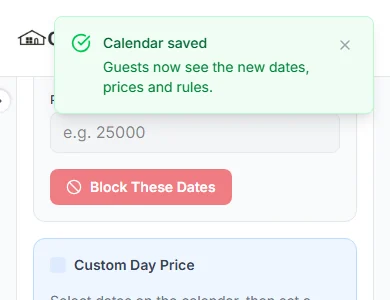
Good to know: You see "Calendar saved". Guests now see the new dates.
Do it now
Open all dates, or only some
The switch "Open all dates by default" decides this.
When it is on, guests can book any date you have not blocked.
When it is off, guests can only book dates you open. Pick the dates, then press "Add Availability Window".
You cannot close booked nights
Booked nights are crossed out. You cannot change them here. If you try, you see "You cannot close nights that are already booked."
Cannot host a stay that is booked? You must cancel it and give a reason. See how to cancel a booking as a host.
The lists under the calendar
| List | What it shows |
|---|---|
| List"Availability Windows" | What it showsThe date windows you added, and any price you gave them. |
| List"Blocked Dates" | What it showsThe dates you closed. |
| List"Booked nights" | What it showsNights guests booked, with a link to each booking. |
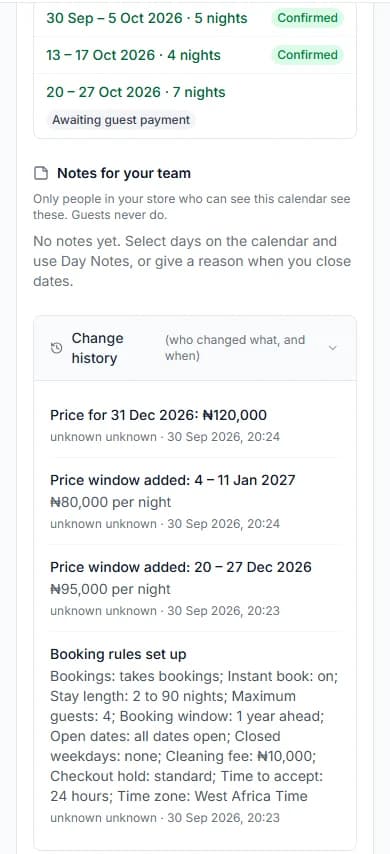
| List"Notes for your team" | What it showsYour day notes. Guests never see them. |
| List"Change history" | What it showsWho changed what, and when. |
Listed on another site too?
There is no calendar sync. When you get a booking somewhere else, block those dates here straight away.
Messages you might see
| The message | What to do |
|---|---|
| The message"Some of the dates you closed have just been booked, so they cannot be closed. Take them out of your closed dates and save again." | What to doA guest booked while you worked. Take those dates out, then save again. |
Questions people ask
Do guests see why I closed a date?
No. They see "Closed". Your reason stays private.
Do calendar changes wait for approval?
No. They go live as soon as you save.
How do I undo changes I have not saved?
Press "Discard". It undoes the changes you have not saved yet.
Who can change the calendar?
The store owner, and team members whose role has "Update / Process Orders" ticked.
Read next
- Getting bookableHow to set night prices for busy days and seasonsYour listing price is your normal night price. You can set a different price for some dates, or for one day.
- Getting bookableHow to set your booking rules and instant bookChoose how guests book. Set the shortest and longest stay, the most guests and how far ahead. Then say yes yourself, or let instant book do it.
- Requests and decisionsHow to cancel a booking as a hostIf you truly cannot host, cancel before the guest arrives. Say why. The guest gets back what they paid for the stay.
More about getting bookable
- How to make your short let bookable onlineSet your home as a "Short Let". Give it a night price. Then tick "Take bookings online".
- How to offer longer-stay discounts and free nightsGive guests a discount, or a free night, for staying longer. They get the one that saves them more, never both.
- How to choose your free-cancellation timePick how long before check-in guests can cancel for free. After that time, they cannot cancel.
- How to add house rules, arrival steps, door code and Wi-FiWrite your house rules and arrival steps once. Guests see them when their booking is confirmed. They see the codes only after you check them in.
More on Cabans
Still stuck?
Tell us what happened. If you have a booking number, add it. Our team will help.
Contact usLast updated