Getting bookable
How to choose your free-cancellation time
The short answer
Pick how long before check-in guests can cancel for free. After that time, they cannot cancel.
Step by step
Step 1: Open your listing’s edit page.
In the seller menu, press "Listings List". Then open the home.
Step 2: Find the part called "Cancellation".
Step 3: Open "Guests can cancel for a full refund until".
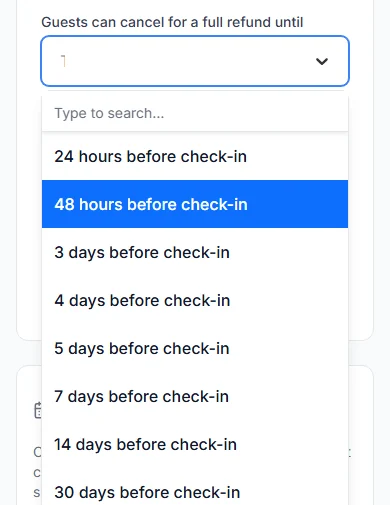
Step 4: Pick a time before check-in.
You can pick 24 hours (one day). Or pick 2, 3, 4, 5, 7, 14 or 30 days.
Step 5: Save the listing.
Our team checks the change before guests see it.
Do it now
If you pick nothing
Guests can cancel for free until 48 hours (2 days) before check-in.
How the time is worked out
We start from the check-in day and your check-in time. Then we count back the time you picked.
Example: check-in is Tuesday from 14:00 (2 in the afternoon). You picked 48 hours. Guests can cancel for free until Sunday at 14:00.
The 30-day rule
Picked 30 days? It only counts for guests who book more than 30 days before check-in.
A guest who books closer to check-in gets less time. They can cancel for free until 15 days before check-in.
What the guest gets back
A guest who cancels in time gets back everything they paid for the stay. That includes your cleaning fee and the caution deposit.
Paystack’s fee is not refunded. The guest paid it on top.
The Cabans team sends the refund and emails the guest. It reaches them within 14 days (two weeks), usually in about 5.
Guests who book late
A guest can book after your free-cancellation time has passed. Then they can never cancel.
We show them this before they pay.
There is no “no cancellation” choice
Every short let lets guests cancel for free for a while. You choose how long that is.
Questions people ask
Can I make my short let non-refundable?
No. Every short let lets guests cancel for free up to a time you choose.
Does a guest get some money back if they cancel late?
No. After your free-cancellation time, guests cannot cancel at all.
Which times can I pick?
24 hours, or 2, 3, 4, 5, 7, 14 or 30 days before check-in. If you pick nothing, it is 48 hours.
Can I cancel a booking myself?
Yes, before the guest arrives. You must give a reason. The guest gets back everything they paid for the stay. See how to cancel a booking as a host.
Read next
- Getting bookableHow to make your short let bookable onlineSet your home as a "Short Let". Give it a night price. Then tick "Take bookings online".
- Requests and decisionsHow to accept or decline a booking requestA guest has paid and is waiting. Press "Accept booking". Or press "Decline", and they get back what they paid for the stay.
- Requests and decisionsHow to cancel a booking as a hostIf you truly cannot host, cancel before the guest arrives. Say why. The guest gets back what they paid for the stay.
- Changing or cancellingHow to cancel a bookingCancel before the free-cancellation time. You get back all you paid for the stay, deposit too.
More about getting bookable
- How to set night prices for busy days and seasonsYour listing price is your normal night price. You can set a different price for some dates, or for one day.
- How to offer longer-stay discounts and free nightsGive guests a discount, or a free night, for staying longer. They get the one that saves them more, never both.
- How to set your booking rules and instant bookChoose how guests book. Set the shortest and longest stay, the most guests and how far ahead. Then say yes yourself, or let instant book do it.
- How to open, close and block datesAll days are open unless you close them. Pick the dates you cannot host, and block them.
More on Cabans
Still stuck?
Tell us what happened. If you have a booking number, add it. Our team will help.
Contact usLast updated