Host Academy · Lesson 5 · about 6 minutes
Your calendar and booking rules
The short answer
All days are open to start with. Close the days you cannot host, and set your rules. Guests see nothing new until you save and publish the calendar.
What you will learn
- How to close one day of the week, every week.
- How to block dates you cannot host.
- How to set the shortest stay, the longest stay and the most guests.
- How to choose how far ahead guests can book.
- How to save, so guests see your changes.
Set your calendar, step by step
Step 1: Open your listing’s edit page.
Go to "Listings List" and open your short let. Scroll down to "Availability, prices and booking rules".
Step 2: Untick any day you always close.
All days are open to start with. Say you never host on Sundays. Untick "Sun". Guests then see every Sunday as "Closed".
Step 3: Block dates you cannot host.
Pick the dates. Open "Block Dates". Add a "Reason (optional)", like "Maintenance". Press "Block These Dates".
Good to know: Guests see those nights as "Closed". They never see your reason.
Step 4: Set your booking rules.
Use the boxes in the table below. Leave a box alone to keep the normal setting.
Step 5: Press "Review and save calendar".
A box lists every change. Check it.
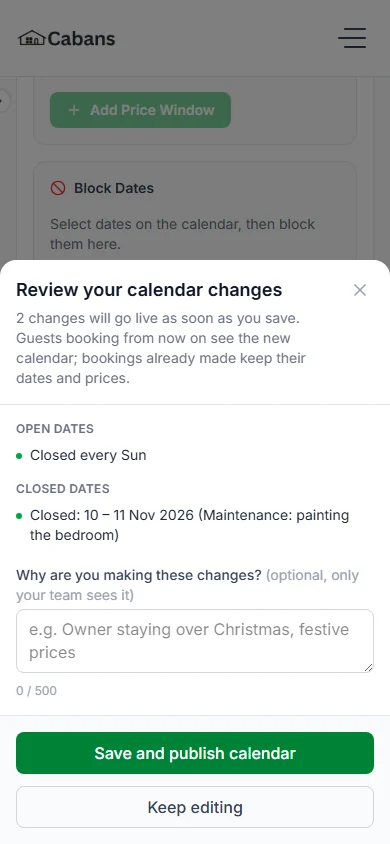
Step 6: Press "Save and publish calendar".
Guests see your new dates and rules at once. Bookings already made keep their dates and prices.
Your booking rules
These rules are for the whole listing, not for single dates.
| The box | What it means | If you change nothing |
|---|---|---|
| The box"Minimum stay (nights)" | What it meansThe fewest nights a guest can book. | If you change nothing1 night |
| The box"Longest stay (nights)" | What it meansThe most nights a guest can book. | If you change nothing90 nights (about three months) |
| The box"Maximum guests (optional)" | What it meansThe most people who can stay. | If you change nothing"No limit" |
| The box"Guests can book up to" | What it meansHow far ahead guests can book. | If you change nothing"1 year ahead" (365 days) |
| The box"Take bookings online" | What it meansUntick it to pause new bookings. Bookings you have are kept. | If you change nothingTicked |
Numbers you can pick
- Shortest and longest stay: 1 to 731 nights. 731 nights is about two years.
- The longest stay cannot be shorter than the shortest stay.
- Most guests: 1 to 500.
- How far ahead: 30 days, or 2, 3 or 6 months. Or 1 year, 18 months or 2 years.
Open all dates, or only some
"Open all dates by default" is on to start with. Guests can book any date you have not blocked.
Turn it off to open only the dates you choose. Then add each run of open dates with "Add Availability Window".
Notes for your team
Use "Day Notes" to put a note on a day, like "Public holiday". Only your team sees it. Guests never do.
"Change history" shows who changed what, and when.
Let the home somewhere else too?
Cabans does not copy bookings from other websites. If you let the home another way, block those dates here yourself.
Do it early, before a guest books them. You cannot block nights a guest has booked. They are crossed out.
Good to know
- The listing’s Save button does not save the calendar.
- A bar tells you how many calendar changes are not saved yet.
- Changed your mind before saving? Press "Discard".
Your practice task
Do this on the real screen. The "Your listings" button is just below.
- Open one short let and find the "Calendar".
- Find the day boxes, from "Sun" to "Sat".
- Find "Block Dates" and the booking rules.
- Only practising? Press "Discard" so nothing is saved.
- Then answer the three questions below. After that, go on to lesson 6: Your cancellation promise.
Try it yourself
Open the real screen and find each step from this lesson.
Check what you learned
Pick an answer, then press "Check my answer". You can try again as many times as you like.
Questions people ask
Can guests book a night I have closed?
No. Closed nights show as "Closed", and nobody can book them.
Can I set a longer minimum stay just for December?
No. The shortest and longest stay are for the whole listing. Only prices and open or closed dates change by date.
Can a guest stay longer than they booked?
Only if you approve it and the extra nights are free. The whole stay must still fit your "Longest stay (nights)".
Does Cabans copy my dates from other websites?
No. If you let the home another way, block those dates here yourself.
Read next
- Getting bookableHow to open, close and block datesAll days are open unless you close them. Pick the dates you cannot host, and block them.
- Getting bookableHow to set your booking rules and instant bookChoose how guests book. Set the shortest and longest stay, the most guests and how far ahead. Then say yes yourself, or let instant book do it.
More on Cabans
Still stuck?
Tell us what happened. If you have a booking number, add it. Our team will help.
Contact usLast updated