Host Academy · Lesson 6 · about 5 minutes
Your cancellation promise
The short answer
Guests can cancel for free until a time you choose. If you choose nothing, it is 48 hours (2 days) before check-in. Cancel in time, and they get back what the stay cost.
What you will learn
- What your free-cancellation time is.
- Which times you can choose.
- The 30-day rule, with an example.
- What a guest gets back, and what to do if you must cancel.
Choose your time, step by step
Step 1: Open your listing’s edit page.
Go to "Listings List" and open your short let. Find the "Cancellation" part of the form.
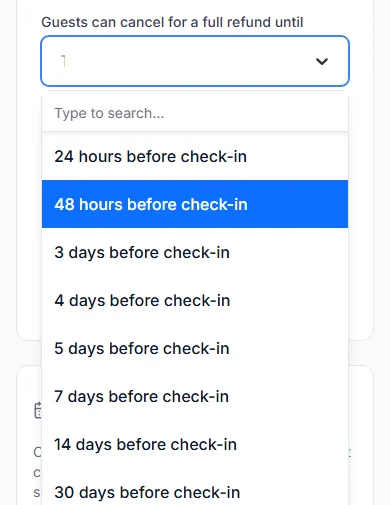
Step 2: Find "Guests can cancel for a full refund until".
This is your free-cancellation time. It counts back from check-in.
Step 3: Pick a time.
Pick 24 hours (one day) before check-in. Or pick 2, 3, 4, 5, 7, 14 or 30 days. If you pick nothing, it is 48 hours (2 days).
Step 4: Save the listing.
Your new time waits for our team to approve it. Until then, guests see your old time.
How the time is worked out
Start at the check-in day and time. Then count back your free-cancellation time.
Say check-in is Thursday 8 October at 14:00 (2 in the afternoon). Your time is 48 hours.
Guests then see "Free cancellation until Tue 6 Oct 2026, 14:00 WAT". WAT means West Africa Time, the time in Nigeria.
The 30-day rule
This rule only matters if you pick 30 days.
A guest who books more than 30 days before check-in gets the full 30 days.
A guest who books closer can cancel for free until 15 days before check-in. Not later.
Say a guest books 20 days before check-in. They can cancel for free for 5 days. Then the free time ends, 15 days before check-in.
Booked too late to cancel
Sometimes a guest books after the free time has passed. Then they can never cancel. They are told this before they pay.
What the guest gets back
- A guest who cancels in time gets 100% back. That means all they paid for the stay.
- That covers the nights, the cleaning fee and the caution deposit.
- Paystack’s fee is not refunded. Paystack is the payment company we use. The guest paid its fee on top.
- They do not need your yes. The booking is cancelled at once.
- The Cabans team sends the refund and emails the guest. It arrives within 14 days (two weeks), usually in about 5.
- There is no "no cancellation" choice. Every short let has a free-cancellation time.
If you must cancel
You can cancel before the guest arrives and before check-in time. Open the booking and press "Cancel booking".
You must give a reason. The guest sees it. They get back all they paid for the stay, and the nights open again.
Try not to cancel. Block dates early instead, so no guest books them.
Your practice task
Do this on the real screen. The "Your listings" button is just below.
- Open one short let and find "Guests can cancel for a full refund until".
- Find the note about the 30-day rule and read it.
- Only save if you want to change your time.
- Then answer the three questions below. After that, go on to lesson 7: Answer requests fast, or use instant book.
Try it yourself
Open the real screen and find each step from this lesson.
Check what you learned
Pick an answer, then press "Check my answer". You can try again as many times as you like.
Questions people ask
Can I make my short let non-refundable?
No. Every short let has a free-cancellation time. The shortest is 24 hours (one day) before check-in.
Does a guest need my permission to cancel?
No. If they cancel in time, the booking is cancelled at once. They get back what they paid for the stay.
Can a guest cancel after the free time ends?
No. After that, the guest can no longer cancel the booking.
Read next
- Getting bookableHow to choose your free-cancellation timePick how long before check-in guests can cancel for free. After that time, they cannot cancel.
- Requests and decisionsHow to cancel a booking as a hostIf you truly cannot host, cancel before the guest arrives. Say why. The guest gets back what they paid for the stay.
- Changing or cancellingHow to cancel a bookingCancel before the free-cancellation time. You get back all you paid for the stay, deposit too.
More on Cabans
Still stuck?
Tell us what happened. If you have a booking number, add it. Our team will help.
Contact usLast updated