Host Academy · Lesson 7 · about 5 minutes
Answer requests fast, or use instant book
The short answer
A request comes only after the guest has paid. Accept or decline it before your time runs out. Or turn on instant book, and paid bookings are confirmed for you.
What you will learn
- How long you have to answer a request.
- How to accept or decline one.
- What instant book does.
- How to answer a guest who wants new dates.
- How to answer a guest who wants to stay longer.
Answer a request, step by step
Step 1: Watch for the email.
The subject starts "New booking request for", then your home’s name. The guest has already paid.
Step 2: Open "Bookings", then the "Requests" tab.
In the seller menu, open "ORDERS", then "Bookings". An orange number shows how many requests are waiting.
Step 3: Open the request.
The panel says "New booking request". It shows the time you have left, like "Answer within 23 hours".
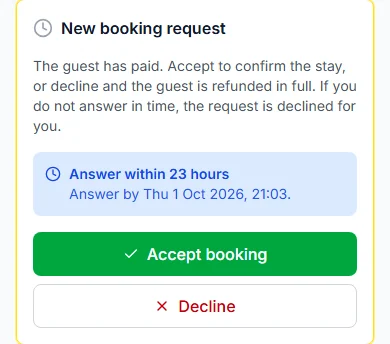
Step 4: Press "Accept booking", or press "Decline".
Accept, and the stay is confirmed. You see "Booking accepted. The guest has been told."
Good to know: If you decline, the guest gets back all they paid for the stay. The nights go back on sale. You cannot undo it.
Step 5: Give a reason if you decline.
Type it in "Reason for the guest (optional)". Then press "Decline request".
Your time to answer
You have 24 hours (one day) from when the guest pays. The screen calls this "Within 24 hours (standard)".
You can pick another time in "Time to accept a request". Choose 2, 6, 12, 24, 48 or 72 hours, or 7 days. 72 hours is 3 days, and 7 days is one week.
If time runs out, the request is declined for you. The guest gets back all they paid for the stay. You get an email that says the request lapsed.
Pick a time you can really keep. A missed request is a lost guest.
Instant book
"Instant book" is off to start with. You find it in "Availability, prices and booking rules".
Turn it on, and "Paid bookings are confirmed straight away, without waiting for you." You get an email for each new confirmed booking.
Guests see a badge on your listing. It says "Instant booking" or "Host confirms".
Turn it on only if your calendar is always right. Save with "Review and save calendar", then "Save and publish calendar".
When a guest asks for new dates
A guest can ask to change their dates or guests. It shows in "Requests" as "Date change requested".
You see "Now" and "Asked for" side by side. You also see if the price goes up, goes down or stays the same.
Press "Approve new dates", or press "Keep the original dates". Then confirm in the box that opens.
If you do not answer in time, the request lapses. The booking stays as it was.
When a guest asks to stay longer
A guest who is fully checked in can ask for more nights. The booking shows "The guest wants to stay longer".
Press "Approve extension" or "Decline". Answer within your time to answer. You must answer before the guest’s check-out.
If you approve, the extra nights go on the guest’s bill. They pay within 24 hours, or by check-out if that is sooner. If they do not pay, the nights go back on sale.
If you do not answer, the request lapses. Nothing is charged.
Changes that need no answer
- A shorter stay inside the same dates, made before the free-cancellation time ends.
- Fewer guests on the same dates.
- These happen straight away. You do not need to do anything.
Your practice task
Do this on the real screen. The "Open Bookings" button is just below.
- Open the "Requests" tab. Is anyone waiting?
- Then open a listing’s "Availability, prices and booking rules". Find "Instant book" and "Time to accept a request".
- Only save if you want to change them.
- Then answer the three questions below. After that, go on to lesson 8: Get ready for arrival.
Try it yourself
Open the real screen and find each step from this lesson.
Check what you learned
Pick an answer, then press "Check my answer". You can try again as many times as you like.
Questions people ask
Do I see requests from guests who have not paid?
No. A request reaches you only after the guest has paid.
Can I undo a decline?
No. Declining cannot be undone. The guest gets back all they paid for the stay, and the nights go back on sale.
Who pays Paystack’s fee when I decline?
The guest paid it on top of the price, and it is not refunded. They get back all they paid for the stay. Refunds reach the guest within 14 days, usually in about 5.
Does the guest see why I declined?
Only if you write a reason in "Reason for the guest (optional)".
Read next
- Requests and decisionsHow to accept or decline a booking requestA guest has paid and is waiting. Press "Accept booking". Or press "Decline", and they get back what they paid for the stay.
- Getting bookableHow to set your booking rules and instant bookChoose how guests book. Set the shortest and longest stay, the most guests and how far ahead. Then say yes yourself, or let instant book do it.
- Requests and decisionsHow to use your Bookings page"Bookings" shows every guest in tabs. New requests, arriving, staying, leaving and past.
More on Cabans
Still stuck?
Tell us what happened. If you have a booking number, add it. Our team will help.
Contact usLast updated