Host Academy · Lesson 11 · about 6 minutes
Check-out and the caution deposit
The short answer
Check the home and press "Confirm check-out". Then release the whole caution deposit, or raise a dispute if something was damaged. Our team decides a dispute.
What you will learn
- How to confirm a guest’s check-out.
- How to add photos of how the home was left.
- How to release the caution deposit.
- How to raise a fair dispute, with proof.
- What to do if a guest leaves early, and when you are paid.
Finish the stay, step by step
Step 1: Watch the "Leaving" tab.
When your guest presses "I am leaving", we email you. The booking moves to "Leaving".
Step 2: Check the home.
Walk through every room. Look for anything broken or missing.
Step 3: Press "Confirm check-out".
A box opens. You can add up to 10 "Condition photos" of how the home was left. They are kept privately with the booking.
Good to know: You can confirm even if the guest never pressed "I am leaving".
Step 4: Press "Confirm check-out" again, or "Upload photos and confirm".
The guest stops seeing the codes. The booking is now "Completed".
Step 5: Look at the "Caution deposit" panel.
A caution deposit is money the guest paid in case something got damaged. The panel shows the amount. Now pick one of two things.
Step 6: All fine? Press "Approve full refund".
A box asks "Release the whole deposit?" Press "Release deposit". Our team sends it back to the guest. It reaches them within 14 days, usually in about 5.
Good to know: After this, you cannot raise a dispute about this stay.
Step 7: Something damaged or missing? Press "Raise a dispute".
Fill in "Amount to keep" and "What happened". Add your evidence. Then press "Raise dispute".
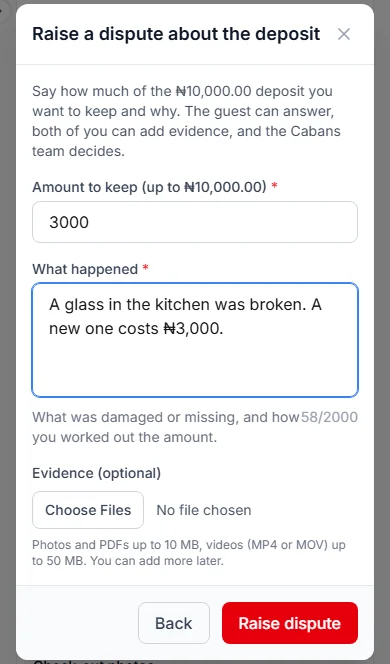
How to raise a fair dispute
- "Amount to keep": type how much you ask to keep. It must be more than nothing, and not more than the deposit.
- "What happened": say what was damaged or missing. Say how you worked out the amount.
- Write at least 10 characters, and no more than 2,000. A character is one letter, number or space.
- "Evidence": add photos, videos or PDF files, up to 30 in all. Photos from before and after the stay help most.
- Only claim for real damage. Ask for what it really costs.
What happens next
The guest and our team see your messages. You can reply and add more evidence.
Our team reads both sides. Then we decide how much you keep. It can be nothing, some or all of the deposit. The rest goes back to the guest.
Nothing is kept until our team decides. We email you both when it is decided.
Settle it soon: the 14-day rule
The guest can ask our team for the deposit. They can do this from 14 days (two weeks) after check-out. We email you if they do.
Our team may then release it, unless you raise a dispute first.
Once the deposit is released, you cannot raise a dispute. So check the home soon after the guest leaves.
If your guest leaves early
Sometimes a guest leaves before their check-out date. The nights they did not use are not refunded. They are not put back on sale either.
You can choose to give those nights back. The booking shows "The guest left early". Press "Refund unused nights".
The guest gets money back for the unused nights. Those nights go back on sale from today. You cannot undo this.
Your payout goes down by the refund.
When you are paid
After check-out, the booking shows a card called "Your payout". Your payout is the money we send you for the stay.
It shows what the guest paid, any refunds and the "Cabans commission (5%)". A commission is our share for running Cabans.
Your payout is due 7 days (one week) after check-out. If the guest presses "Approve payment", it is due at once.
The Cabans team sends it to your account. We email you the transfer reference when it is paid.
The caution deposit is not in your payout. If our team gives you part of it after a dispute, that part is added.
If nobody confirms check-out
The stay ends by itself 2 days after the check-out date.
It is better to confirm it yourself, once you have checked the home.
Your practice task
Do this on the real screen. The "Open Bookings" button is just below.
- Open the "Past" tab. Is any caution deposit still to settle?
- Open one booking and find the "Caution deposit" panel.
- Find "Approve full refund" and "Raise a dispute". Only press them for a real stay.
- Then answer the three questions below. After that, go on to lesson 12: Run it as a team and earn more.
Try it yourself
Open the real screen and find each step from this lesson.
Check what you learned
Pick an answer, then press "Check my answer". You can try again as many times as you like.
Questions people ask
Can I release only half of the deposit?
No. You can only release the whole deposit. To keep some of it, raise a dispute.
Can I open two disputes on one booking?
No. A booking can have one open dispute at a time.
My guest left early. Do they get money back?
Only if you press "Refund unused nights". It never happens by itself.
Who decides a dispute?
The Cabans team. We read both sides and look at the evidence. Then we decide how much you keep.
Read next
- Check-out and the caution depositHow to confirm check-out and add condition photosWhen your guest leaves, check the home. Add photos if you like. Then press "Confirm check-out".
- Check-out and the caution depositHow to release a caution deposit or raise a disputeIf all is fine, give the deposit back. If something was damaged, raise a dispute with proof. Our team decides.
- Leaving and your caution depositWhat to do if your host disputes your depositIf your host says something was damaged, tell your side and add photos. Our team reads both sides and decides.
More on Cabans
Still stuck?
Tell us what happened. If you have a booking number, add it. Our team will help.
Contact usLast updated