Host Academy · Lesson 10 · about 6 minutes
During the stay: requests, extras and bills
The short answer
Guests ask for things, like fresh towels: press "Start", then "Mark as done". Sell extras, like bottled water. If a guest used extras, send them a bill.
What you will learn
- How to answer a guest’s request.
- How to set up stay extras to sell.
- How to send a bill for extras a guest used.
- The smallest bill a card can pay.
Answer a request, step by step
Step 1: Watch for the email.
When a guest asks for something, we email you. The subject says who needs what, and where.
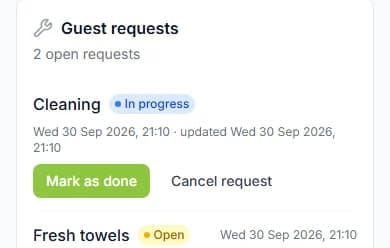
Step 2: Open the booking and find "Guest requests".
It shows how many requests are open.
Step 3: Press "Start" when you begin.
The guest sees "In progress" on their stay page.
Step 4: Press "Mark as done" when it is finished.
If you cannot do it, press "Cancel request". "Done" and "Cancelled" cannot be changed later.
Good to know: Guests do not get an email when you update a request. They see it on their stay page.
What guests can ask for
Guests pick one of five kinds of request. A stay can have up to 10 open requests at a time.
- "Room service": fresh towels, bed linen or supplies.
- "Cleaner": a clean of the home.
- "Call for help": they need you to get back to them.
- "Report an issue": something broken, missing or not working.
- "Something else": any other request.
Set up stay extras
Stay extras are things guests can buy during a stay. Think bottled water, breakfast, snacks or an airport pick-up.
In the seller menu, open "Stay Extras". Press "Add your first extra", or "Add an extra".
Add a "Photo", a "Name" and a "Price (₦)". In "Where guests can buy it", tick your short lets. Press "Add extra".
Extras go live at once. A new photo waits for our team to approve it.
Who sees extras, and who brings them
- Only checked-in guests at a home you ticked see your extras. They never show in search.
- Delivery is free for the guest. You bring the extra to the home.
- Your stock does not go down by itself when guests order. Update it when you restock or run out.
Send a bill for extras a guest used
Say your guest drank 2 bottles of water from the fridge. You can bill them for it.
On the booking, open "Bill the guest". Pick how many of each extra they used. Add a "Note for the guest (optional)".
Press "Review bill", then "Send bill". The guest pays it from their stay page.
They pay through Paystack, the payment company we use. Paystack’s fee is paid by the guest, on top.
- You can bill while the guest has the keys, is checked in, or is leaving.
- You can only bill extras that are on sale for this home.
- Once it is sent, you cannot take the bill back here. So check it first.
- Pressing send twice by mistake within 2 minutes does not bill twice.
The ₦1,000 rule
A card cannot pay less than ₦1,000 (one thousand naira). So a bill must come to ₦1,000 or more.
If it is less, the screen tells you. Add more to the bill.
Cabans works out the bill’s total. A discount for buying more can apply.
Bills and your payout
Your payout is the money we send you for a stay. Paid bills and extras are added to it.
Cabans keeps a 5% commission, as it does on the nights. A commission is our share for running Cabans.
Did you approve extra nights? They show on the guest’s bill as "Stay extension". The guest pays them like any bill.
Bill fairly
- Only bill what the guest really used.
- Say what it was for in the note.
- Tell your guest before you send it.
Your practice task
Do this on the real screen. The "Open Stay Extras" button is just below.
- Look at the preview, "How guests see it".
- Have something guests often need, like bottled water? Add it as an extra, and tick the homes that sell it.
- Then answer the three questions below. After that, go on to lesson 11: Check-out and the caution deposit.
Try it yourself
Open the real screen and find each step from this lesson.
Check what you learned
Pick an answer, then press "Check my answer". You can try again as many times as you like.
Questions people ask
What is the smallest bill I can send?
₦1,000 (one thousand naira). A card cannot be charged less than that.
Where do paid bills show?
A bill also shows under "Orders" once the guest has paid it.
Do paid bills count in my payout?
Yes. Paid bills and extras are added to your payout for the stay. Then the 5% commission comes off.
Can guests see my extras before they arrive?
No. Only guests who are fully checked in at a home you ticked can see them.
Read next
- Arrival and the stayHow to answer guest requests and bill extrasGuests can ask you for things. Press "Start", then "Mark as done". If they used extras, send them a bill.
- Getting bookableHow to sell stay extras to your guestsAdd things guests can buy while they stay, like water or breakfast. Tick which homes sell them.
- During your stayHow to order extras and pay your billYour host may sell things like bottled water. Add them to your basket and pay. Your host brings them to you.
More on Cabans
Still stuck?
Tell us what happened. If you have a booking number, add it. Our team will help.
Contact usLast updated