
A useful property management app for a Nigerian landlord starts with the tenancy you actually run. A flat let yearly needs clear payment and repair records, while a short let needs availability and a routine for every arrival and departure. This guide is part of our free landlord tools collection. It explains what to check, what Cabans covers and which tasks still need your own process.
Start with the vacancy if the property is empty: list your rental property free on Cabans. An organised filing system cannot produce rent from a property nobody can find. Once an applicant is interested, you still need to verify their suitability, arrange viewings yourself and agree the tenancy terms with appropriate legal advice.
Separate yearly tenancies from short lets
A yearly tenancy usually has relatively few payment dates but a long relationship between the parties. The important record is not just a total received: it is which property and period a payment covers, what remains unpaid, what was agreed about repairs and what happens at renewal. Keep the signed agreement and payment evidence together so another person can understand the position without reading years of chats.
A short let has a different rhythm. Dates can become unavailable quickly, guests need arrival information, and the person handing over keys may not be the person who answers booking requests. Choose tools that match that work. Do not assume a product with a calendar also handles a residential tenancy, or that a tenant payment record automatically controls a short-let calendar.
If you offer both kinds of accommodation, give each unit a clear name and keep the records distinct. Check the tenancy agreement, estate rules and any other permission before changing how a property is used. A booking system does not grant permission to operate a short let.
Begin with the vacancy: listings, enquiries and one link
Make the empty property discoverable
- The problem
- Photos shared in private messages only reach people who already know you.
- On Cabans
- A free Cabans rental listing gives the property a page with its photos, location, description and rent details.
- The result
- Prospective tenants can judge whether it fits before contacting you, reducing repeated basic questions. You remain responsible for accuracy and availability.
Write the listing before choosing an elaborate management system. Name the actual area and property type, state what is available, use recent photographs and disclose the separate charges applicants need to understand. Compare the information shown in other rental listings without treating every asking rent as proof of what a tenant will pay. Our rental advertising guide gives the fuller checklist.
Keep enquiries connected to the advertised property
- The problem
- An applicant sends a short message and you cannot tell which flat they mean.
- On Cabans
- Cabans sends listing enquiries and chat to the seller inbox, so you can answer from the enquiry about that property.
- The result
- You have a clearer starting point for the conversation. You or your agent still arrange viewings and carry out tenant screening.
Set a routine for checking enquiries, including when an agent is away. Ask for only the information needed at that stage and keep sensitive application documents out of public listing descriptions. An enquiry inbox is not a tenant verification service or a promise that everyone who messages is ready to rent.
Share the properties you actually have available
- The problem
- An old collection of photos keeps circulating after one property has been let.
- On Cabans
- Your free Cabans business page brings your live listings together, with your logo, banner and business name in the link.
- The result
- You can share one page and update the underlying listings as availability changes. The address remains cabans.ng/store/... with the store number and business name.
The page uses Cabans' design and does not include a custom domain. Keep your business details current and pause or archive unavailable listings. A shareable page helps someone explore your properties; it does not remove the need to answer questions or guarantee that a listing will appear at a particular search position.
Keep documents clear from the start
A landlord app should help you understand the documents you rely on, rather than hide them behind a status label. A receipt should identify the parties, premises, amount, period and payment date. An agreement should make the term, rent, payment frequency, deposits and responsibilities clear. Use consistent names and the same unit address across both, especially in a block where several flats have similar descriptions.
Prepare a document with the facts in the right places
- The problem
- Reusing an old document can leave a previous tenant's details or the wrong rental period behind.
- On Cabans
- The rent receipt generator and tenancy agreement fill-in tool offer a preview, print and plain-text copy.
- The result
- You can check the completed draft before saving or sharing it. The entered details stay in your browser; keep your own secure copies.
Speak to a lawyer before using an agreement or serving a notice. State laws, the property and the specific tenancy can affect what a document must say. The quit notice template offers usual notice guidance in words and a date you choose; it does not calculate or certify a legally valid expiry date. Do not confuse a printable template with professional legal review.
Manage the yearly tenancy in Cabans
See how to collect rent online in Nigeria with Cabans on the web.
Connect the agreed tenancy to its payments
- The problem
- A payment arrives without a clear record of which tenancy and period it belongs to.
- On Cabans
- The landlord sets up a tenancy in Cabans and invites the tenant by email. The tenant signs up or signs in and pays online at the agreed yearly, quarterly or monthly frequency.
- The result
- Payments belong to a tenancy record, with automatic receipts and email reminders before rent is due. The landlord is paid into their payout bank account once the payment clears.
Rent collection is free for landlords. The tenant pays a processing fee on top of the rent, shown before they pay. Review the tenancy details and frequency with the tenant before sending the invitation. Online collection documents the payment; it does not decide a disputed tenancy term or replace a lawyer.
Keep the record useful when payment happens elsewhere
- The problem
- Cash or transfer payments can be missing from the online payment history.
- On Cabans
- The Cabans rent ledger also lets the landlord record cash or transfer payments.
- The result
- The tenancy record can show those payments alongside online rent. Check the evidence before recording a payment, and avoid entering the same transfer twice.
Keep tenancy work with the tenancy
- The problem
- Repair messages, charges and the signed agreement end up in separate places.
- On Cabans
- Cabans supports maintenance requests, other charges such as service charge, caution deposit, agency or legal fees, and keeping the tenancy agreement on file.
- The result
- You can refer to the same tenancy when reviewing a request or charge. You remain responsible for the agreed terms, lawful charges, repairs and responses.
If you also host short lets
Make availability a routine you can check
- The problem
- An unavailable night is easy to overlook when several people handle enquiries.
- On Cabans
- Cabans' short-let bookings tools include an availability calendar and booking requests, with online bookings on by default.
- The result
- You can keep Cabans availability current and manage bookings from their records. There is no iCal or calendar sync, so update availability elsewhere yourself.
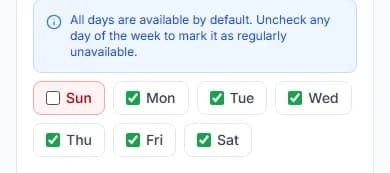
Assign someone to check dates before confirming a stay and to update any other place you advertise. Read how the bookings workflow works before handing it to a colleague. Do not treat a busy calendar as a substitute for a cleaning and inspection routine. Each unit needs a clear plan for the time between guests, including who confirms it is ready.
Check the limits before moving your records
Cabans has no channel manager, iCal or calendar sync, POS, housekeeping rotas or pipeline CRM. If your operation depends on any of these, identify the separate process or tool you need. A property business page also uses Cabans' own design and address. Choosing it does not give you a custom domain or control over the whole marketplace.
Try a routine on the phone you normally use before giving it to a team member. Check that you can read a property description, answer an enquiry and review a document without relying on a large desktop screen. This guide describes Cabans on the web; it does not promise that every web feature exists in a released mobile app. Keep original legal and financial records somewhere you control.
Keep access and copies under control
A shared phone or a forwarded document can expose more information than the next person needs. Decide who is allowed to see application records, signed agreements and payment evidence. Give a colleague the information needed for their task, such as the viewing time and property address, rather than forwarding an entire tenant file. Review access when a staff member or managing agent changes.
Keep a sensible naming system for documents: the property, document type and covered period should be recognisable. Preserve the final signed version separately from drafts. When a receipt is corrected, keep a clear record of the correction instead of silently replacing a copy already given to the tenant. If you print or copy from a browser tool on a shared computer, check where the downloaded or copied information went before leaving it for someone else to use.
Back up important records somewhere other than the device used to create them. Test that you can open the copy and that a trusted authorised person can find it if you are unavailable. A folder full of unnamed photographs can be almost as difficult to use as missing paperwork. Make a review at renewal or handover part of the routine, so you know which matters are settled and which still need action.
When choosing any property software, also ask how you would leave it. You should understand which records are available to you and how to preserve the evidence you need. Do not assume a feature exists because another product calls it standard. Check the actual workflow and keep independent copies of the legal documents and payment evidence on which you rely.
A practical setup checklist
- List each property, its tenancy type and the person responsible for keeping its records current.
- Prepare accurate availability, recent photos and a written breakdown of the advertised terms.
- Publish the rental listing and check how a prospective tenant sees it on a phone.
- Set a routine for enquiries, screening and viewings, with a named person to cover absences.
- Review the agreement with a lawyer and keep receipts, payment evidence and handover records together.
- For short lets, check the calendar whenever a booking or availability changes.
- Review records at renewal or departure and close out unresolved charges and repair questions in writing.
Start with one property and walk through a real task from beginning to end. If a colleague took over tomorrow, could they tell which unit is vacant, where an enquiry came from, what a payment covers and where the signed agreement is? Fix those gaps before adding more processes. Good tools make the record easier to understand; they do not make the landlord's decisions for them.
Frequently asked questions
What should a property management app do for a Nigerian landlord?
Start with the work you actually do: advertise vacancies, answer enquiries, prepare documents, record payments, track repairs and keep a handover record. A yearly tenancy needs different routines from a short let. Check each feature against a real task before moving your records.
Can I find tenants through Cabans?
You can publish a free rental listing, receive enquiries in your seller inbox and share your business page with its live listings. You or your agent answer applicants, carry out screening and arrange viewings. A listing does not guarantee a tenant or a letting date.
Can I use the landlord tools without sending tenant details to Cabans?
The rent receipt, quit notice and tenancy agreement fill-in tools work in your browser. The details entered into those tools are not sent to Cabans. Keep any document you print, copy or save securely, and have legal documents reviewed by a lawyer.
Does Cabans include a channel manager or a full property CRM?
No. Cabans does not provide iCal or calendar sync, a channel manager, a pipeline CRM, POS or housekeeping rotas. Its business page uses the Cabans design and a cabans.ng/store/... address, with your business name in the link, without a custom domain.
How does Cabans handle rent for a yearly tenancy?
The landlord sets up the tenancy and invites the tenant by email. The tenant signs up or signs in and pays online at the agreed yearly, quarterly or monthly frequency. The service is free for landlords. The tenant sees a processing fee on top of rent before paying. The landlord is paid into their payout bank account once the payment clears.
Choose your next task
Return to free landlord tools, prepare a rent receipt, review the tenancy agreement template or plan your next rental advertisement. If the property is ready for tenants, list it free on Cabans and answer enquiries as they arrive.
Take the next step
Keep your research practical: search for property in Lagos, compare live options for land for sale in Lagos, or list your property on Cabans to reach active buyers and renters.
Not ready yet? Get an email when new listings go up in Lagos.