Host Academy · Lesson 3 · about 5 minutes
Price your nights
The short answer
Your listing price is the normal price for a night. Add a price window for busy dates, or a day price for one special day. The day price wins, then the window.
What you will learn
- What your normal night price is.
- How to set one price for a run of dates.
- How to set a price for one single day.
- Which price a guest pays when prices overlap.
- How to save, so guests see your new prices.
Set your prices, step by step
Step 1: Open your listing’s edit page.
Go to "Listings List" and open your short let. Scroll down to "Availability, prices and booking rules".
Step 2: Pick a start date and an end date.
In the "Calendar", pick the first day, then the last day.
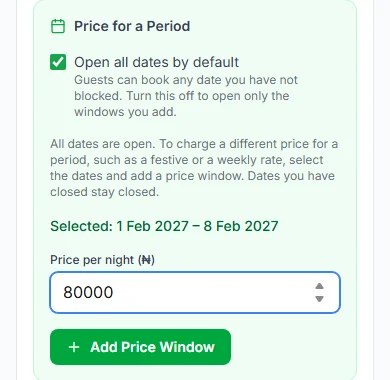
Step 3: Add one price for those dates.
In "Price for a Period", type the "Price per night (₦)". Press "Add Price Window".
Good to know: This is called a price window. Use it for a busy week, like the Christmas holidays.
Step 4: Set a price for one special day.
Pick one day. Open "Custom Day Price" and type the "Price per day (₦)". Press "Set Price". To change it later, press "Update Price".
Step 5: Press "Review and save calendar".
A box shows every change you made. You can write why, if you like. Only your team sees that.
Step 6: Press "Save and publish calendar".
Your new prices go live at once. No approval is needed. You see "Calendar saved".
Which price wins?
One night can have more than one price. Here is the order, from strongest to weakest.
- First: a day price for that one day.
- Next: a price window that covers that night.
- Last: your listing’s own price.
- Two windows cover the same night? The window that starts later wins.
A worked example
Your normal price is ₦40,000 (forty thousand naira) a night.
For one busy week, you add a price window. It is ₦50,000 (fifty thousand naira) a night.
31 December is in that week. You give it its own day price.
A guest who stays that week pays the day price on 31 December. They pay ₦50,000 for the other nights in the window. Outside the window, nights cost ₦40,000.
Weekly and daily prices
Guests always pay by the night. A "Per Day" price is charged for each night. A "Per Week" price is shared over 7 nights.
So ₦350,000 (three hundred and fifty thousand naira) a week is ₦50,000 a night. That is ₦350,000 ÷ 7 = ₦50,000.
A price window uses your listing’s "Payment Frequency", unless you pick another.
What guests see
- Each free day shows its night price in small blue text, like "₦50k".
- When nights cost different amounts, they see "Night prices vary by date".
- Their "Price Breakdown" groups the nights that cost the same.
- Cabans works out each guest’s total for them.
Good to know
- New prices never change bookings already made. Those keep their dates and prices.
- A night with no price cannot be booked. Keep every open night priced.
- The listing’s Save button does not save the calendar. Use "Review and save calendar".
- Changing your normal listing price waits for our team. Price windows and day prices do not.
- Changed your mind before saving? Press "Discard".
Your practice task
Do this on the real screen. The "Your listings" button is just below.
- Open one short let and find "Availability, prices and booking rules".
- Find "Price for a Period" and "Custom Day Price".
- Only practising? Press "Discard" so nothing is saved.
- Then answer the three questions below. After that, go on to lesson 4: Offers that fill longer stays.
Try it yourself
Open the real screen and find each step from this lesson.
Check what you learned
Pick an answer, then press "Check my answer". You can try again as many times as you like.
Questions people ask
Can I charge more at weekends?
There is no weekend setting. Give each weekend day its own day price, or add a price window that covers it.
Can I charge more for extra guests?
No. Prices are per night, not per guest. The number of guests does not change the price.
Do day prices need approval?
No. Price windows and day prices go live when you press "Save and publish calendar". Only the listing’s own price waits for our team.
Read next
- Getting bookableHow to set night prices for busy days and seasonsYour listing price is your normal night price. You can set a different price for some dates, or for one day.
- Getting bookableHow to open, close and block datesAll days are open unless you close them. Pick the dates you cannot host, and block them.
- Getting bookableHow to offer longer-stay discounts and free nightsGive guests a discount, or a free night, for staying longer. They get the one that saves them more, never both.
More on Cabans
Still stuck?
Tell us what happened. If you have a booking number, add it. Our team will help.
Contact usLast updated